
1. Introduction
22mm illuminated push buttons are the standard for industrial control panels. Their universal size, clear visual feedback, and durable design make them ideal for machinery start/stop, mode selection, and status indication. The built-in illumination (typically LED) enhances visibility in low-light environments, reduces operator errors, and simplifies system monitoring.
Installing and wiring these buttons incorrectly can lead to malfunctions (e.g., no illumination, intermittent operation) or safety hazards (e.g., short circuits, incorrect status indication). For example, a reversed polarity connection may damage the LED, while poor terminal crimping can cause overheating in high-current applications.
This guide covers everything you need to know about 22mm illuminated push buttons: key specifications, tools required, step-by-step installation, wiring diagrams for common industrial scenarios, real-world application cases, and troubleshooting tips. Whether you’re building a new control panel or retrofitting existing equipment, these best practices ensure reliable performance and compliance with industrial standards.
Key terms defined upfront:
- 22mm Illuminated Push Button: A push button switch with a 22mm mounting diameter and integrated illumination (LED, incandescent) for status indication.
- NO/NC Contacts: Normally Open (completes circuit when pressed) or Normally Closed (breaks circuit when pressed) electrical contacts.
- Voltage Rating: The electrical voltage the button (and its illumination) can safely handle (e.g., 24V DC, 120V AC).
- Polarity: The positive (+) and negative (-) electrical connections required for LED illumination (critical for proper function).
2. Key Specifications of 22mm Illuminated Push Buttons
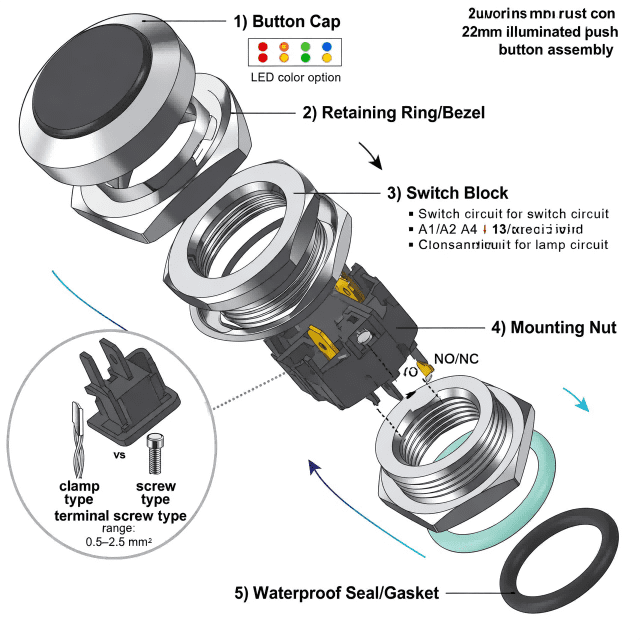
Before installation, verify these specs to ensure compatibility with your control panel and system:
2.1 Electrical Ratings
- Switch Voltage/Current: Industrial models typically support 24V DC (PLC-controlled systems), 120V AC, or 240V AC. Current ratings range from 5A–20A (match to your load, e.g., 10A for lighting, 16A for motor controls).
- Illumination Voltage: LED illumination often uses 24V DC (low-voltage, energy-efficient) or 120V AC. Some models have dual-voltage compatibility (12V–24V DC).
- Contact Configuration: Single-pole single-throw (SPST) NO/NC, or double-pole double-throw (DPDT) for complex circuits.
2.2 Mechanical & Environmental Features
- Actuator Type: Mushroom head (easy to identify, emergency stop applications), flat head (standard use), or flush head (prevents accidental activation).
- Illumination Color: Red (stop/error), green (run/normal), yellow (warning), blue (mode selection)—align with industrial safety standards (e.g., red for emergency functions).
- IP Rating: IP65 (dust-tight, water-resistant) for control panels; IP67 for harsh environments (e.g., washdown areas).
- Mount Type: Panel mount (standard 22mm cutout) with threaded bushing for secure installation.
2.3 Compliance & Safety
- Certifications: CE (European), UL (North American), CSA (Canadian) to meet regional electrical standards.
- Safety Standards: Compliant with IEC 60947-5-1 (push button switches) and IEC 60068-2 (environmental resistance).
Case Study: Spec Mismatch AvoidanceA manufacturing plant attempted to wire 24V DC illuminated push buttons to a 120V AC control panel. The LEDs burned out immediately, and the switch contacts arced. After verifying specs, the plant replaced them with dual-voltage (24V DC/120V AC) models (Schneider Electric XB5 series), resolving the issue and avoiding costly downtime.
3. Tools & Preparation for Installation
3.1 Essential Tools
- Panel punch or hole saw (22mm diameter) for creating mounting cutouts.
- Screwdriver set (flathead/Phillips) and terminal crimpers for wiring.
- Wire strippers (adjustable to 14–22 AWG, standard industrial wire gauge).
- Multimeter for testing voltage, polarity, and continuity.
- Torque wrench (to tighten terminal screws to manufacturer specs, typically 0.5–1 N·m).
- Cable ties and wire labels for organizing wiring in the control panel.
3.2 Pre-Installation Checks
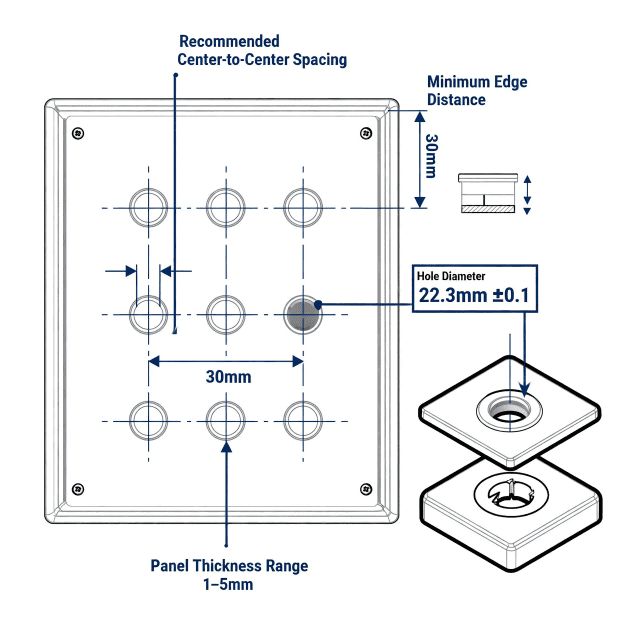
- Verify control panel cutouts are 22mm (±0.5mm) to ensure a tight fit (loose cutouts compromise IP rating).
- Confirm switch voltage/current matches the system (e.g., 24V DC for PLC inputs).
- Test illumination functionality with a bench power supply before installation (avoids installing faulty buttons).
- Inspect button components (gaskets, terminals, LED) for damage (e.g., cracked lenses, bent pins).
4. Step-by-Step Installation Guide
4.1 Step 1: Mount the Push Button to the Control Panel
- Locate the pre-drilled 22mm cutout in the control panel (use a panel punch if creating a new cutout).
- Insert the push button from the front of the panel (illuminated side facing outward).
- Secure the button from the back using the provided locknut—tighten by hand first, then use a wrench to snug (avoid over-tightening, which can crack the panel or damage the button’s housing).
- Ensure the button is flush with the panel surface (misalignment can lead to water ingress or accidental activation).
4.2 Step 2: Wire the Switch Contacts (NO/NC)
Wiring depends on the button’s contact type (NO/NC) and application (e.g., start/stop control, status indication). Below is a standard wiring for a 24V DC PLC-controlled system:
- Identify the switch terminals (labeled “NO” for Normally Open, “NC” for Normally Closed, “COM” for Common).
- Connect the power supply’s positive (+) lead to the “COM” terminal.
- For a “start” function (NO contact), connect the “NO” terminal to the PLC input module.
- For a “stop” function (NC contact), connect the “NC” terminal to the PLC input module.
- Connect the PLC input’s return lead to the power supply’s negative (-) terminal.
- Crimp terminals on all wire ends (avoids loose connections and arcing).
4.3 Step 3: Wire the Illumination Circuit
LED illumination requires correct polarity—reversed wiring will result in no light:
- Identify the illumination terminals (labeled “L+/V+” for positive, “L-/V-” for negative; some AC models use “L” and “N”).
- For DC illumination (24V DC): Connect “V+” to the positive side of the power supply, “V-” to the negative side.
- For AC illumination (120V AC): Connect “L” to the hot wire, “N” to the neutral wire (no polarity required).
- If using a separate power supply for illumination (common in control panels), ensure it’s properly grounded.
4.4 Step 4: Secure & Organize Wiring
- Route wires away from sharp edges and high-heat components (e.g., transformers) in the control panel.
- Use cable ties to bundle wires (leave slack for thermal expansion, avoid over-tightening).
- Label wires with terminal numbers or function (e.g., “Start Button NO” “Illumination +”) for future maintenance.
- Tighten all terminal screws to the manufacturer’s torque specification (over-tightening damages terminals; under-tightening causes resistance and heat).
4.5 Step 5: Test the Installation
- Turn on the control panel power (use a lockout/tagout procedure to ensure safety).
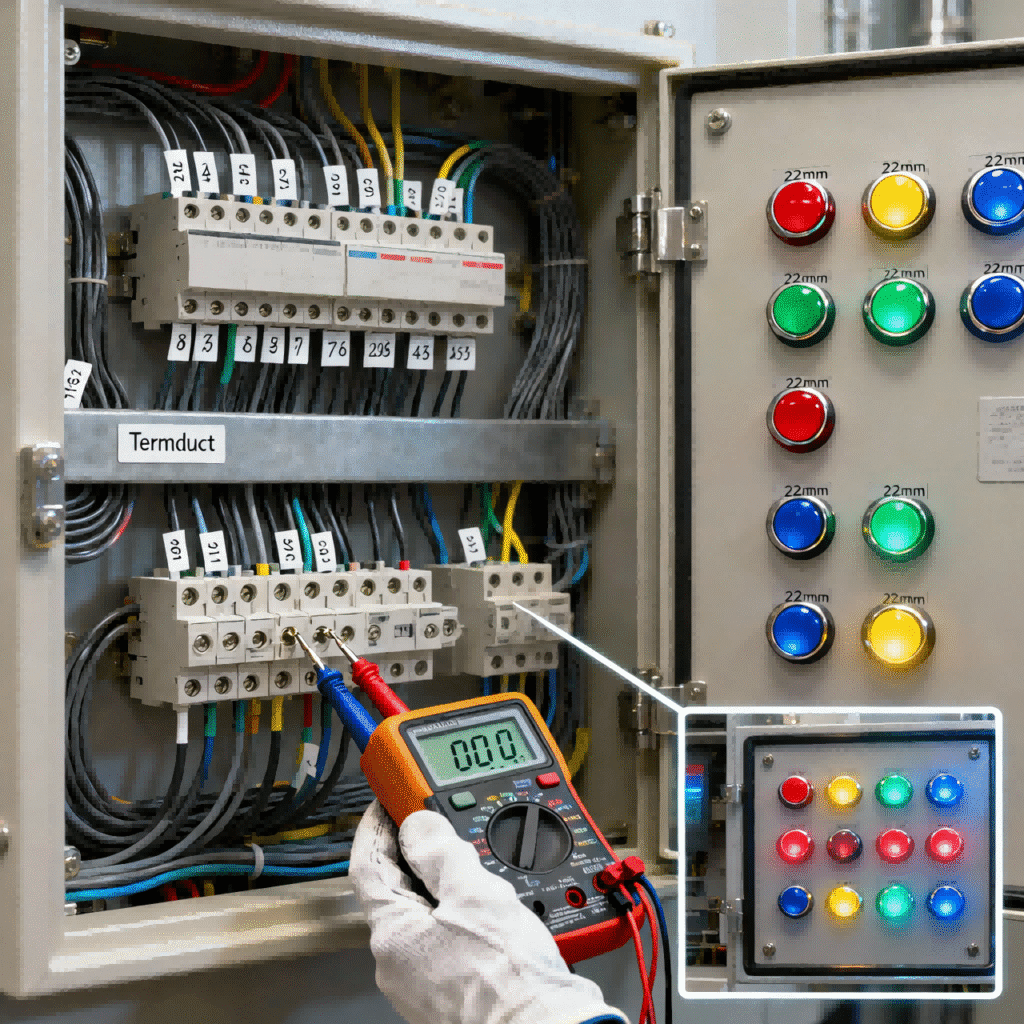
- Test switch operation: Press the button to verify NO/NC contacts activate/deactivate (use a multimeter to check continuity).
- Verify illumination: Confirm the LED lights up when the button is pressed (or continuously, depending on wiring) and matches the expected color.
- Check for errors: No flickering, overheating, or unusual noise—these indicate wiring issues (e.g., loose connections, polarity reversal).
Case Study: Proper Installation for Automotive Control PanelsAn automotive assembly plant installed 50+ 22mm illuminated push buttons (Siemens 3SU1 series) in control panels for robotic welding stations. Following the steps above, the team:
- Used 22mm panel punches for precise cutouts.
- Labeled all wires and tested polarity before finalizing.
- Torqued terminals to 0.8 N·m per Siemens specs.Result: Zero button failures over 2 years of operation, and the illuminated buttons improved operator visibility in the high-noise, low-light factory floor.
5. Wiring Diagrams for Common Industrial Scenarios
5.1 Scenario 1: 24V DC PLC-Controlled Start Button (NO, Illuminated)
- Components: 22mm illuminated push button (NO, 24V DC), PLC input module, 24V DC power supply.
- Wiring:
- Power supply (+) → Button “COM” terminal.
- Button “NO” terminal → PLC input (e.g., I0.0).
- PLC input common → Power supply (-).
- Power supply (+) → Button illumination “V+”.
- Power supply (-) → Button illumination “V-“.
- Function: LED lights when the button is pressed; PLC registers the input to start machinery.
5.2 Scenario 2: 120V AC Emergency Stop Button (NC, Illuminated Red)
- Components: 22mm illuminated mushroom head button (NC, 120V AC), motor contactor, 120V AC power supply.
- Wiring:
- Power supply (hot) → Button “COM” terminal.
- Button “NC” terminal → Motor contactor coil.
- Motor contactor coil → Power supply (neutral).
- Power supply (hot) → Button illumination “L”.
- Power supply (neutral) → Button illumination “N”.
- Function: LED is on continuously (indicates ready state); pressing the button breaks the circuit, stopping the motor, and the LED turns off (or stays on—depends on wiring for fault indication).
5.3 Scenario 3: Dual-Function Mode Selector (DPDT, Illuminated Green/Red)
- Components: 22mm illuminated DPDT push button (24V DC), “Auto/Manual” mode circuit.
- Wiring:
- DPDT contacts route power to “Auto” or “Manual” circuit based on press.
- Green LED illuminates when “Auto” mode is active; red LED for “Manual”.
- Function: Illumination color indicates current mode, simplifying operator oversight.
6. Troubleshooting Common Issues
6.1 No Illumination (LED)
- Causes: Reversed polarity, incorrect voltage, loose illumination terminals, faulty LED.
- Fixes: Use a multimeter to check polarity (swap wires if reversed); verify voltage matches the button’s rating; re-tighten terminals; replace the button if the LED is burnt out.
6.2 Switch Doesn’t Activate (No Contact Closure)
- Causes: Wrong terminal wiring (e.g., using NC instead of NO), loose COM/NO/NC connections, damaged contacts.
- Fixes: Double-check wiring against the button’s datasheet; test continuity with a multimeter; re-crimp or replace wires; replace the button if contacts are arced or damaged.
6.3 Illumination Flickers or Is Dim
- Causes: Voltage drop (undersized wires), loose connections, incompatible power supply.
- Fixes: Use thicker gauge wire (e.g., 18 AWG instead of 22 AWG) for long runs; re-tighten illumination terminals; replace the power supply with a higher-current model.
6.4 Button Overheats
- Causes: Overloaded current (button rating too low), poor terminal crimping, short circuit.
- Fixes: Replace with a higher-current button; re-crimp wires to ensure good contact; check for short circuits with a multimeter.
Case Study: Troubleshooting Flickering IlluminationA food processing plant reported flickering LEDs on 22mm push buttons in their control panels. Investigation revealed:
- Wires were undersized (22 AWG) for the 5m run from the power supply.
- Terminal screws were under-tightened, causing resistance.Fixes: Upgraded to 18 AWG wire and re-tightened terminals to 1 N·m. Flickering stopped, and the buttons operated reliably.
7. Conclusion & Reference Resources
22mm illuminated push buttons are critical for industrial control panels, offering clear status indication and reliable operation. Proper installation and wiring—rooted in verifying specs, using the right tools, and following step-by-step procedures—ensure safety, compliance, and long-term performance.
Key takeaways:
- Verify electrical specs (voltage, current) and polarity before installation to avoid LED damage or switch failure.
- Use precise 22mm cutouts and proper torque for mounting to maintain IP rating and stability.
- Follow wiring diagrams tailored to your application (NO/NC, DC/AC) and label wires for maintenance.
- Troubleshoot common issues (no illumination, flickering) with a multimeter to identify polarity, connection, or voltage problems.
Appendix: Key Reference Resources
- IEC 60947-5-1: Industrial Push Button Switch Safety Standard
- UL 60947-5-1: North American Push Button Switch Certification
- Schneider Electric: 22mm Illuminated Push Button Wiring Guide
- Siemens: 3SU1 Series Technical Datasheet
- IDEC: Industrial Control Panel Wiring Best Practices
- National Electrical Code (NEC) Article 409: Industrial Control Panels