
1. Introduction
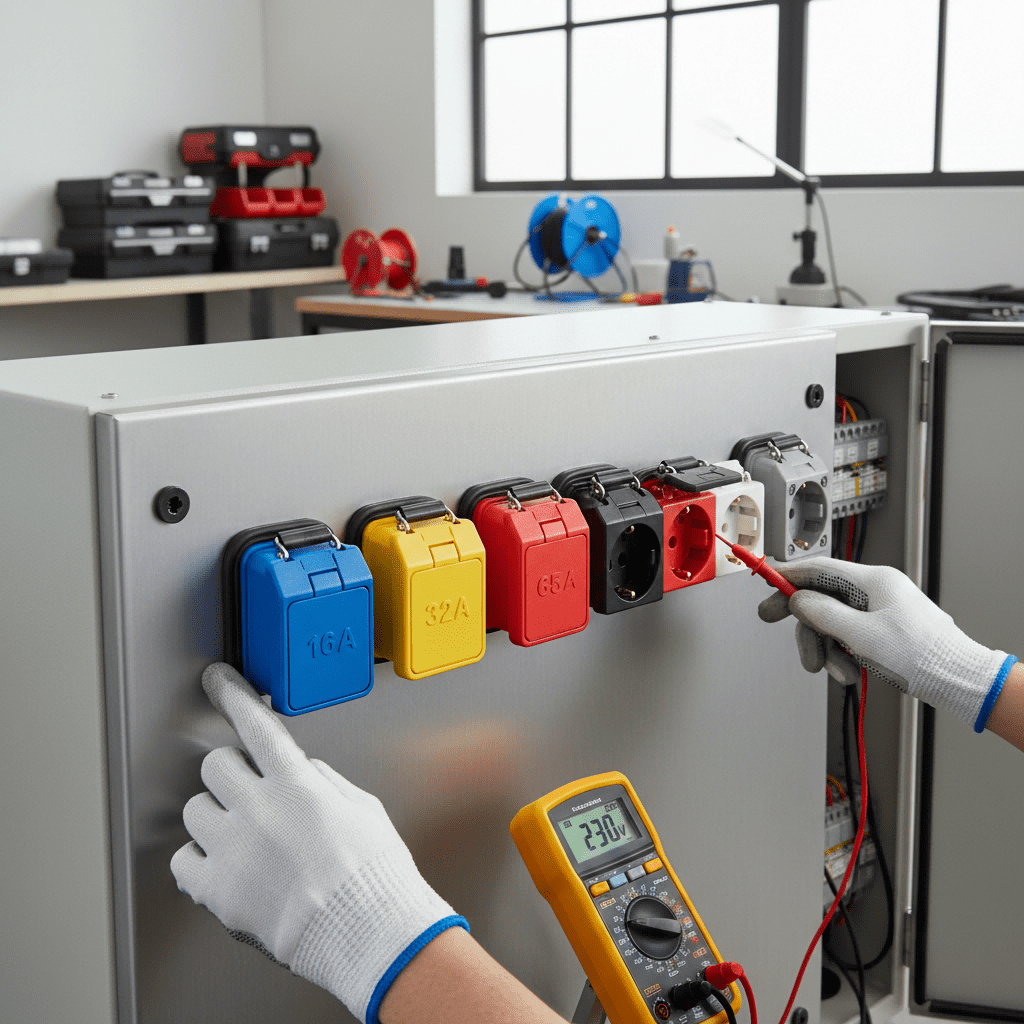
Surface mounted plug sockets are a staple in industrial control panels, offering flexible power distribution for equipment, sensors, and auxiliary devices. Unlike flush-mounted alternatives, they mount directly on the panel surface, simplifying installation, maintenance, and future upgrades. Their design is ideal for retrofits, compact control panels, or applications requiring quick access to power.
Improper installation or wiring of surface mounted plug sockets can lead to critical issues: loose connections may cause overheating, incorrect wiring can damage equipment, and poor mounting can compromise the control panel’s IP rating. For example, a manufacturing plant experienced repeated control panel failures after surface mounted sockets were installed without proper sealing—dust ingress short-circuited the connections, halting production for 8 hours.
This guide covers everything you need to know about surface mounted plug sockets for industrial control panels: key specifications, tools required, step-by-step installation and wiring processes, real-world application case studies, and troubleshooting tips. Whether you’re building a new control panel or upgrading an existing one, these best practices ensure reliable performance, safety, and compliance with industrial standards.
Key terms defined upfront:
- Surface Mounted Plug Socket: A power socket designed to mount directly on the exterior or interior surface of industrial control panels, without requiring a recessed cutout.
- IP Rating (Ingress Protection): A standard (IEC 60529) classifying the socket’s protection against dust and liquids—critical for maintaining control panel integrity.
- Wire Gauge: The thickness of electrical wire (measured in AWG or mm²), which must match the socket’s current rating to prevent overheating.
- Terminal Torque: The specified force for tightening terminal screws, ensuring secure connections without damaging wires or terminals.
2. Key Specifications of Surface Mounted Plug Sockets for Industrial Control Panels
Before installation, verify these specs to ensure compatibility with your control panel and system requirements:
2.1 Electrical Ratings
- Current Capacity: Industrial models typically range from 16A–63A. 16A–32A for low-to-medium power devices (sensors, small motors); 40A–63A for high-power equipment (heaters, pumps).
- Voltage Compatibility: 230V AC single-phase (standard control panel auxiliary power), 400V AC three-phase (heavy-duty equipment), or 12V/24V DC (low-voltage sensors, IoT devices).
- Contact Configuration: Single-pole single-throw (SPST) NO/NC, double-pole double-throw (DPDT), or fused sockets (built-in overload protection for sensitive equipment).
2.2 Mechanical & Environmental Features
- Mount Type: Surface mount with threaded studs or adhesive backing (temporary) for control panel installation. Most use 2–4 mounting holes for secure attachment.
- IP Rating: IP65 (dust-tight, water-resistant) for control panels exposed to moderate dust; IP67 for harsh environments (washdown areas, outdoor panels); IP44 for clean indoor panels.
- Housing Material: Die-cast aluminum (rugged industrial use), stainless steel (corrosion-resistant for coastal or chemical environments), or flame-retardant plastic (lightweight, cost-effective).
- Connector Type: CEE, Type A, Type I, or Cam Lock—align with regional standards and equipment plug types.
2.3 Safety & Compliance
- Certifications: CE (European), UL (North American), CSA (Canadian) to meet regional electrical standards (e.g., IEC 60309 for industrial sockets).
- Flame Rating: V0 (UL 94) for housing materials, preventing fire spread in case of short circuits.
- Vibration Resistance: Compliant with IEC 60068-2-6 to withstand vibration from nearby machinery.
Case Study: Spec Mismatch AvoidanceA food processing plant installed 16A surface mounted sockets (IP44) in a washdown control panel. Daily high-pressure cleaning led to water ingress and socket failures. After verifying specs, the plant replaced them with 32A IP67 stainless steel sockets (Schneider Electric XB4 Series), which matched the panel’s environmental needs. The upgrade eliminated downtime and ensured FDA compliance.
3. Tools & Preparation for Installation
3.1 Essential Tools
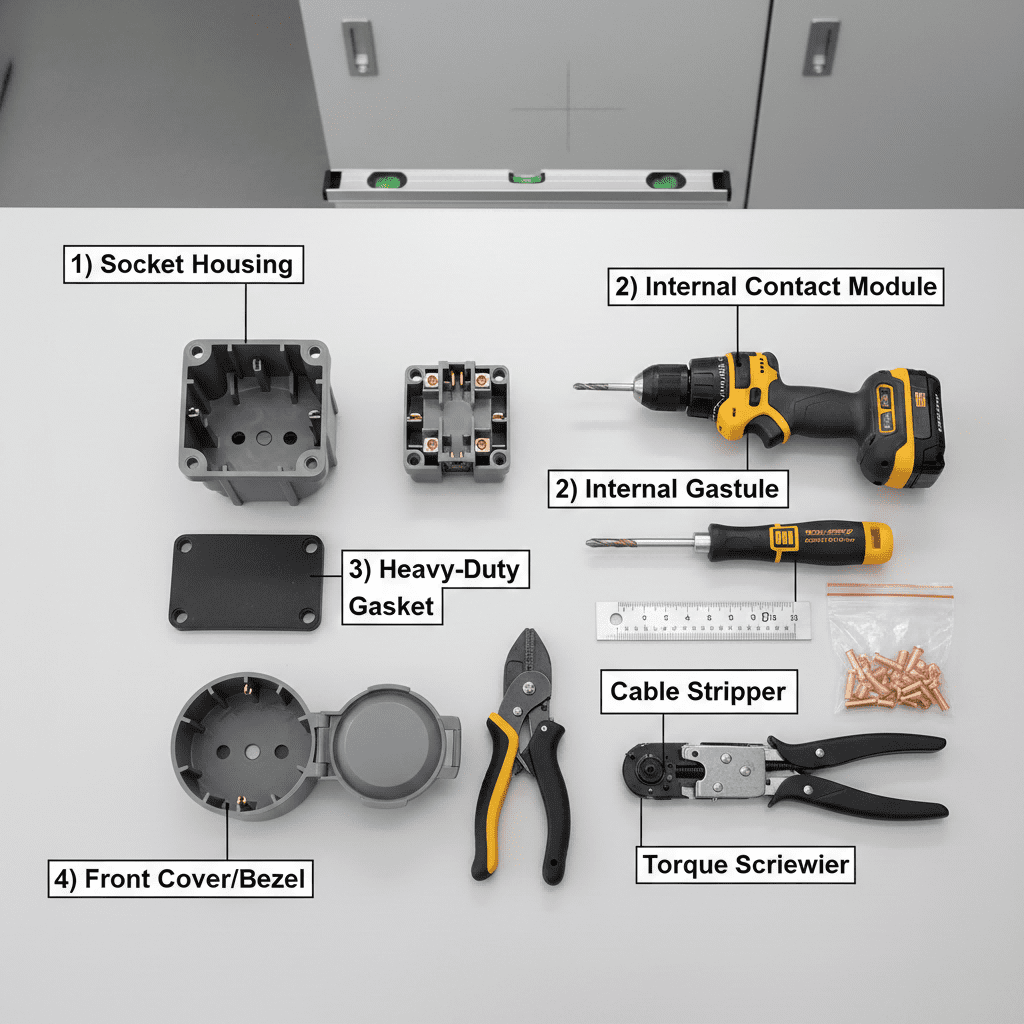
- Screwdriver set (Phillips/flathead) or torque screwdriver (to meet terminal torque specs, typically 0.5–1.5 N·m).
- Wire strippers (adjustable to 14–22 AWG, standard for industrial control panel wiring).
- Terminal crimpers (for insulated or non-insulated terminals) to ensure secure wire connections.
- Multimeter (to test voltage, continuity, and polarity before and after installation).
- Drill and tap set (matching socket mounting hole size) for securing sockets to the control panel.
- Cable ties and wire labels for organizing wiring and simplifying maintenance.
- Gasket cutter or sealant (silicone or polyurethane) to maintain the control panel’s IP rating.
3.2 Pre-Installation Checks
- Verify the control panel’s surface is clean, flat, and free of debris (uneven surfaces compromise sealing).
- Confirm the socket’s current/voltage ratings match the control panel’s power supply and connected equipment.
- Test the socket’s functionality with a bench power supply (check for loose contacts or faulty switches).
- Inspect socket components (gaskets, terminals, housing) for damage (cracked gaskets, bent pins) that could affect performance.
- Ensure wiring gauge matches the socket’s current rating (e.g., 12 AWG for 20A, 10 AWG for 30A).
4. Step-by-Step Installation & Wiring Guide
4.1 Step 1: Plan Socket Placement
- Position sockets at least 10cm apart to avoid wiring crowding and ensure easy plug insertion.
- Keep sockets away from high-heat components (transformers, resistors) to prevent overheating.
- Ensure accessibility: Sockets should be reachable without disassembling the control panel (1.0–1.5m height for external panels).
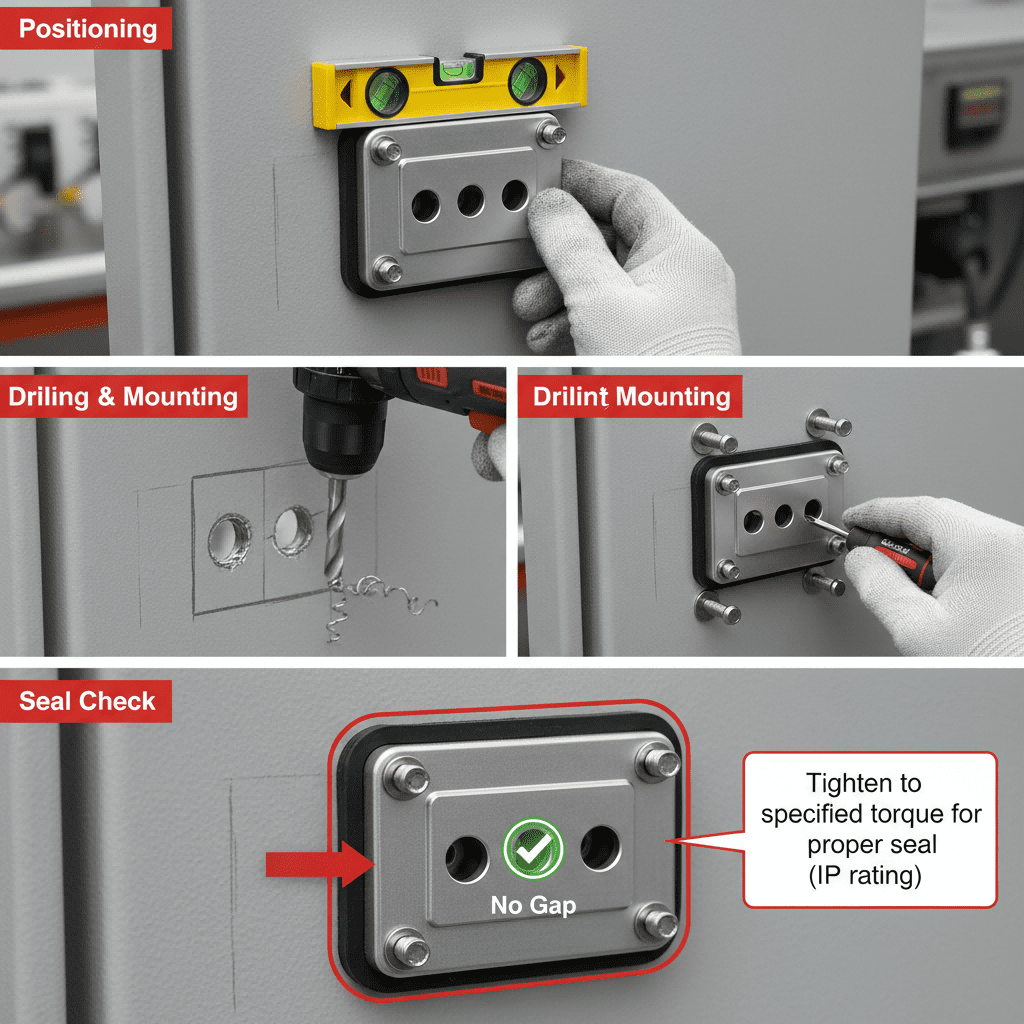
- Mark mounting holes on the control panel using the socket’s template (included with most industrial models).
4.2 Step 2: Mount the Socket to the Control Panel
- Drill pilot holes at the marked positions (use a drill bit slightly smaller than the mounting screws).
- Apply a thin layer of silicone sealant to the socket’s gasket (if not pre-installed) to enhance water/dust protection.
- Place the socket on the control panel surface, aligning the mounting holes with the pilot holes.
- Secure the socket with stainless steel screws (prevents corrosion) and tighten to the manufacturer’s torque spec (typically 1–1.2 N·m)—avoid over-tightening, which can crack the housing or gasket.
- Verify the socket is flush with the panel surface (misalignment compromises the IP rating).
4.3 Step 3: Wire the Socket (AC/DC Guidelines)
For AC Surface Mounted Sockets (230V/400V)
- Turn off the control panel power and lock out/tag out to ensure safety.
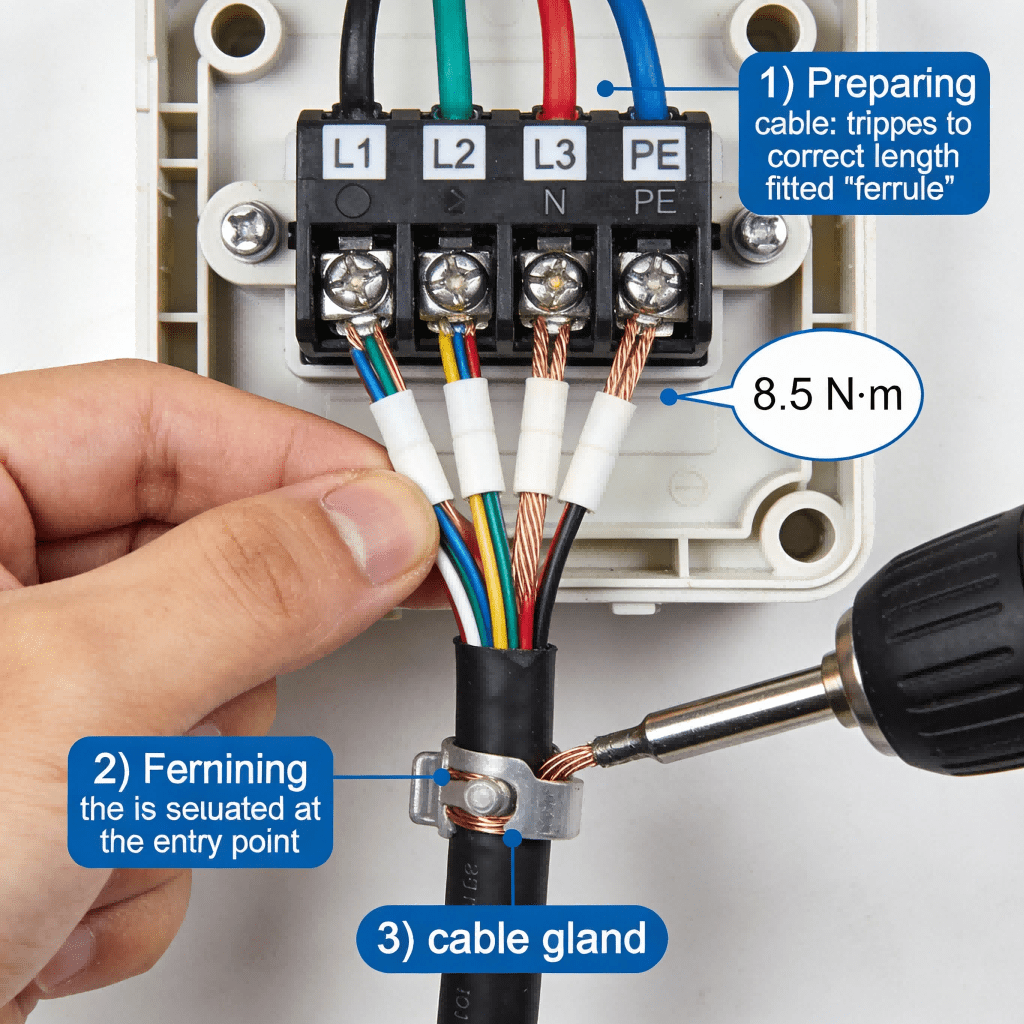
- Identify the socket’s terminals: “L” (line), “N” (neutral), and “PE” (protective earth/ground).
- Strip 6–8mm of insulation from the wire ends (follow the socket’s datasheet for exact length).
- Crimp insulated terminals onto the wire ends (prevents loose connections and arcing).
- Connect the line wire (typically brown/black) to “L”, neutral (blue) to “N”, and ground (green/yellow) to “PE”.
- Tighten terminal screws to the specified torque (e.g., 0.8 N·m for copper wires) to ensure good conductivity.
For DC Surface Mounted Sockets (12V/24V)
- Identify polarized terminals: “V+” (positive) and “V-” (negative) (critical for DC equipment to avoid damage).
- Connect the positive wire (red) to “V+” and negative wire (black) to “V-“.
- Ensure the ground wire (if required) is connected to the socket’s ground terminal or control panel chassis.
- Tighten terminals to the manufacturer’s spec—DC connections are prone to corrosion if loose.
4.4 Step 4: Secure & Organize Wiring
- Route wires away from sharp edges and moving parts (e.g., panel doors) to prevent insulation damage.
- Use cable ties to bundle wires (leave 2–3cm of slack for thermal expansion and maintenance).
- Label wires with terminal numbers or function (e.g., “Socket 1 – Line”, “Socket 2 – DC Positive”) for future troubleshooting.
- Seal wire entry points with cable glands or grommets to maintain the control panel’s IP rating.
4.5 Step 5: Test the Installation
- Remove lockout/tagout and turn on the control panel power.
- Use a multimeter to verify voltage at the socket terminals (ensure it matches the rated voltage).
- Test socket functionality by plugging in a compatible device (check for power delivery and no overheating).
- Inspect for leaks (if the panel is IP-rated) using a low-pressure water jet (IP65/67) or dust test (IP65+).
- Confirm no unusual noise (arcing) or heat—these indicate wiring issues.
Case Study: Proper Installation for Automotive Control PanelsAn automotive assembly plant installed 20+ surface mounted sockets (Siemens 3SU1 Series) in robotic control panels. Following the steps above, the team:
- Used torque screwdrivers to secure sockets and terminals.
- Applied silicone sealant to gaskets for IP65 protection.
- Labeled all wires and tested polarity for DC sockets.Result: Zero socket failures over 3 years of operation, and the control panels maintained their IP rating despite factory dust and vibration.
5. Wiring Diagrams for Common Industrial Scenarios
5.1 Scenario 1: 230V AC Fused Surface Mounted Socket (16A)
- Components: 16A surface mounted socket (fused), 230V AC power supply, control panel circuit breaker.
- Wiring:
- Control panel circuit breaker (16A) → Socket “L” terminal.
- Socket “N” terminal → Control panel neutral busbar.
- Socket “PE” terminal → Control panel ground busbar.
- Fuse (16A) integrated in the socket → Protects against overload.
- Function: Powers low-voltage industrial equipment (sensors, small tools) with overload protection.
5.2 Scenario 2: 24V DC Polarized Surface Mounted Socket (10A)
- Components: 10A DC surface mounted socket (polarized), 24V DC power supply, PLC auxiliary output.
- Wiring:
- 24V DC power supply (+) → Socket “V+” terminal.
- 24V DC power supply (-) → Socket “V-” terminal.
- Socket ground terminal → Control panel chassis ground.
- Function: Powers DC sensors and IoT devices in the control panel, with polarity protection to prevent equipment damage.
5.3 Scenario 3: 400V AC Three-Phase Surface Mounted Socket (32A)
- Components: 32A three-phase socket, 400V AC three-phase power supply, motor contactor.
- Wiring:
- Three-phase lines (L1, L2, L3) → Socket line terminals.
- Neutral (N) → Socket neutral terminal.
- Ground (PE) → Socket ground terminal.
- Function: Powers high-power three-phase equipment (pumps, heaters) from the control panel.
6. Troubleshooting Common Issues
6.1 Socket Has No Power
- Causes: Tripped circuit breaker, loose terminal connections, faulty fuse (fused sockets), incorrect wiring.
- Fixes: Reset the circuit breaker; re-tighten terminals to spec; replace the fuse; verify wiring against the socket’s datasheet.
6.2 Socket Overheats
- Causes: Undersized wire gauge, overloaded current (socket rating too low), loose connections, poor ventilation.
- Fixes: Upgrade to the correct wire gauge (e.g., 10 AWG for 30A); replace with a higher-current socket; re-crimp wires and tighten terminals; ensure adequate spacing from heat sources.
6.3 Dust/Water Ingress (Compromised IP Rating)
- Causes: Damaged gasket, misaligned mounting, missing sealant, loose screws.
- Fixes: Replace the gasket; re-mount the socket to ensure flush alignment; apply silicone sealant to gaps; tighten mounting screws to spec.
6.4 Intermittent Power Supply
- Causes: Corroded terminals, loose plug connection, damaged socket contacts.
- Fixes: Clean terminals with a dry brush (avoid water); replace corroded terminals; inspect the socket’s internal contacts and replace if worn.
Case Study: Troubleshooting Intermittent PowerA logistics warehouse reported intermittent power to sensors connected to surface mounted sockets. Investigation revealed:
- Terminal screws were under-tightened (0.3 N·m vs. the recommended 0.8 N·m).
- Dust had accumulated in the socket contacts due to a damaged gasket.Fixes: Re-tightened terminals to spec, replaced gaskets, and cleaned contacts. The sockets operated reliably afterward, eliminating sensor downtime.
7. Conclusion & Reference Resources
Surface mounted plug sockets are versatile, easy-to-install components for industrial control panels—when installed and wired correctly, they deliver safe, reliable power distribution. Key to success is verifying specs, following proper mounting and wiring practices, and maintaining the control panel’s IP rating.
Key takeaways:
- Match the socket’s current/voltage ratings to the control panel’s power supply and connected equipment.
- Use the correct wire gauge and terminal torque to prevent overheating and loose connections.
- Seal gaskets and wire entry points to maintain the control panel’s IP rating (critical for harsh environments).
- Test functionality and polarity (for DC) before putting the control panel into service.
Appendix: Key Reference Resources
- IEC 60309: Standard for Industrial Plugs, Sockets, and Couplers
- IEC 60529: IP Rating Classification Standard
- UL 498: North American Standard for Industrial Sockets
- Schneider Electric: Surface Mounted Socket Installation Guide
- Siemens: 3SU1 Series Technical Datasheet
- National Electrical Code (NEC) Article 409: Industrial Control Panels
- IEC 60947-5-1: Industrial Switchgear and Controlgear Standards