
1. Introduction
Momentary vs. Latching Push Button,Push button switches are the backbone of industrial control systems. They trigger machinery start/stop, process adjustments, and emergency shutdowns—making them critical for operational efficiency and safety. Among the most common types are momentary push buttons and latching push buttons, each designed for distinct industrial needs.
Many teams struggle to choose between the two. Selecting the wrong type can lead to equipment malfunctions, safety hazards, or unnecessary downtime. For example, using a momentary switch for a machine that requires continuous operation will force operators to hold the button indefinitely. Conversely, a latching switch in an emergency stop circuit could fail to reset safely after an incident.
This guide breaks down the core differences between momentary and latching push buttons. It covers their working principles, industrial applications with real-world case studies, and a step-by-step selection process—ensuring you pick the right switch for your specific use case.
Key terms defined upfront:
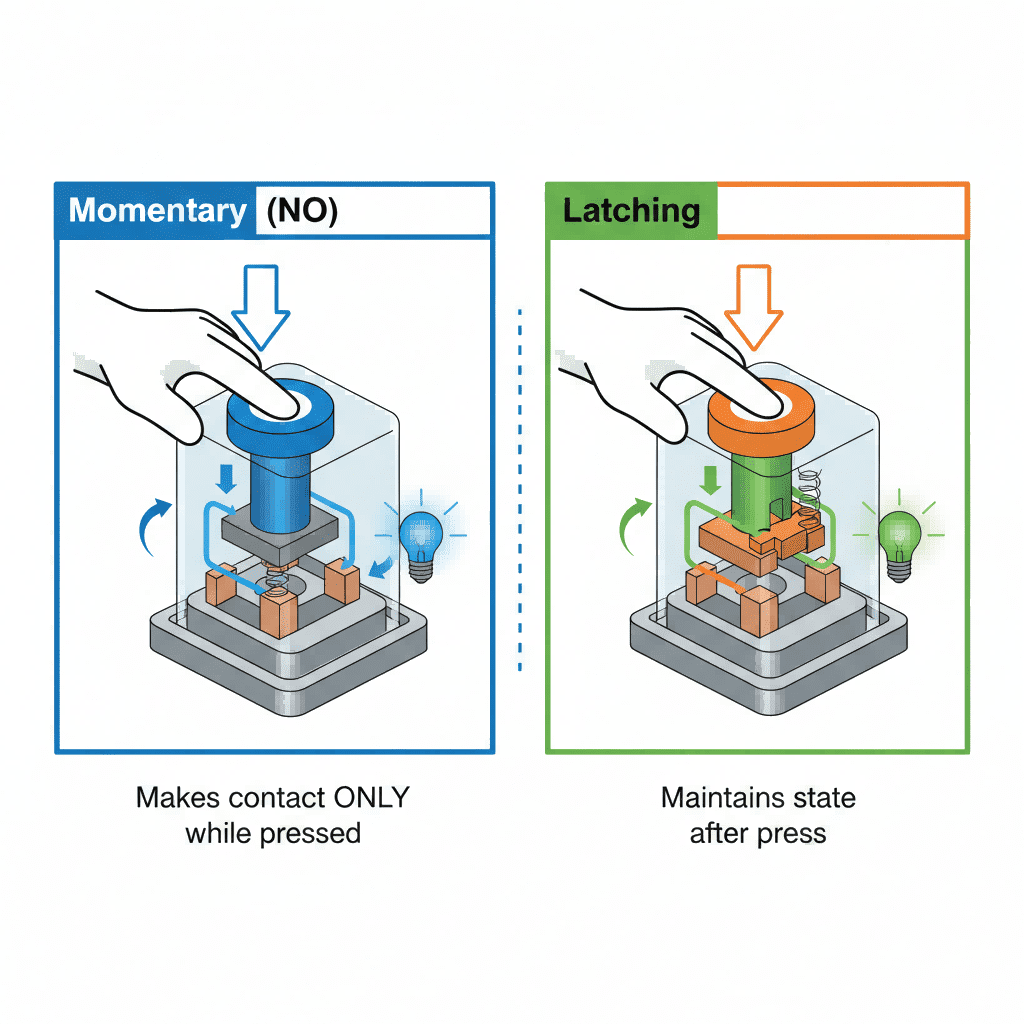
- Momentary Push Button: A switch that only maintains its activated state while physically pressed. It returns to its default position (normally open or normally closed) when released.
- Latching Push Button: A switch that stays in its activated state after being pressed once. It requires a second press (or reset) to return to its default position, locking the circuit on or off.
- Normally Open (NO): A switch that completes the circuit only when pressed.
- Normally Closed (NC): A switch that breaks the circuit only when pressed.
2. Core Differences: Momentary vs. Latching Push Buttons
Understanding the fundamental distinctions between these two switches is critical for industrial applications. Below is a breakdown of their working principles, key features, and functional limits:
2.1 Working Principles
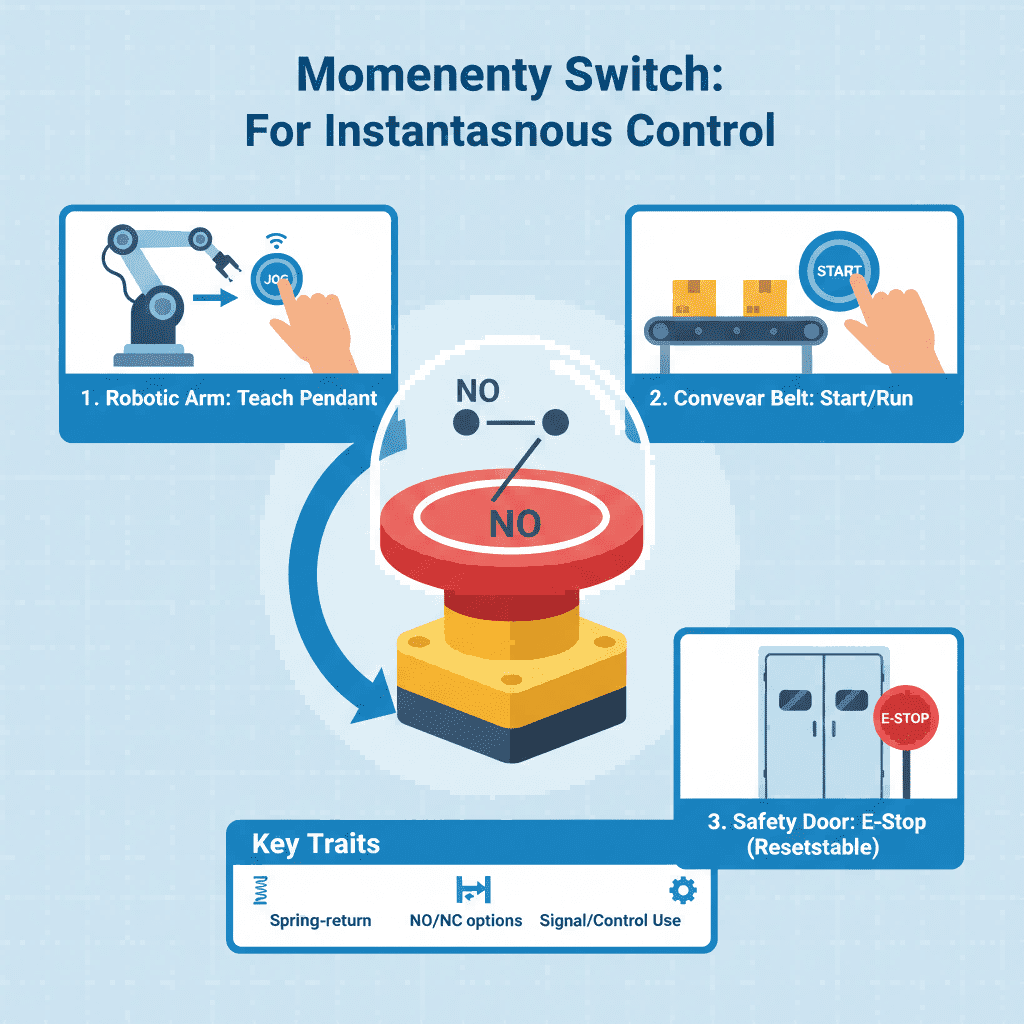
- Momentary Push Button: Relies on a spring-loaded mechanism. When pressed, the contacts close (NO) or open (NC) to trigger a temporary action. As soon as pressure is released, the spring returns the switch to its original position, cutting the circuit. Common examples include doorbell buttons and machine jog controls.
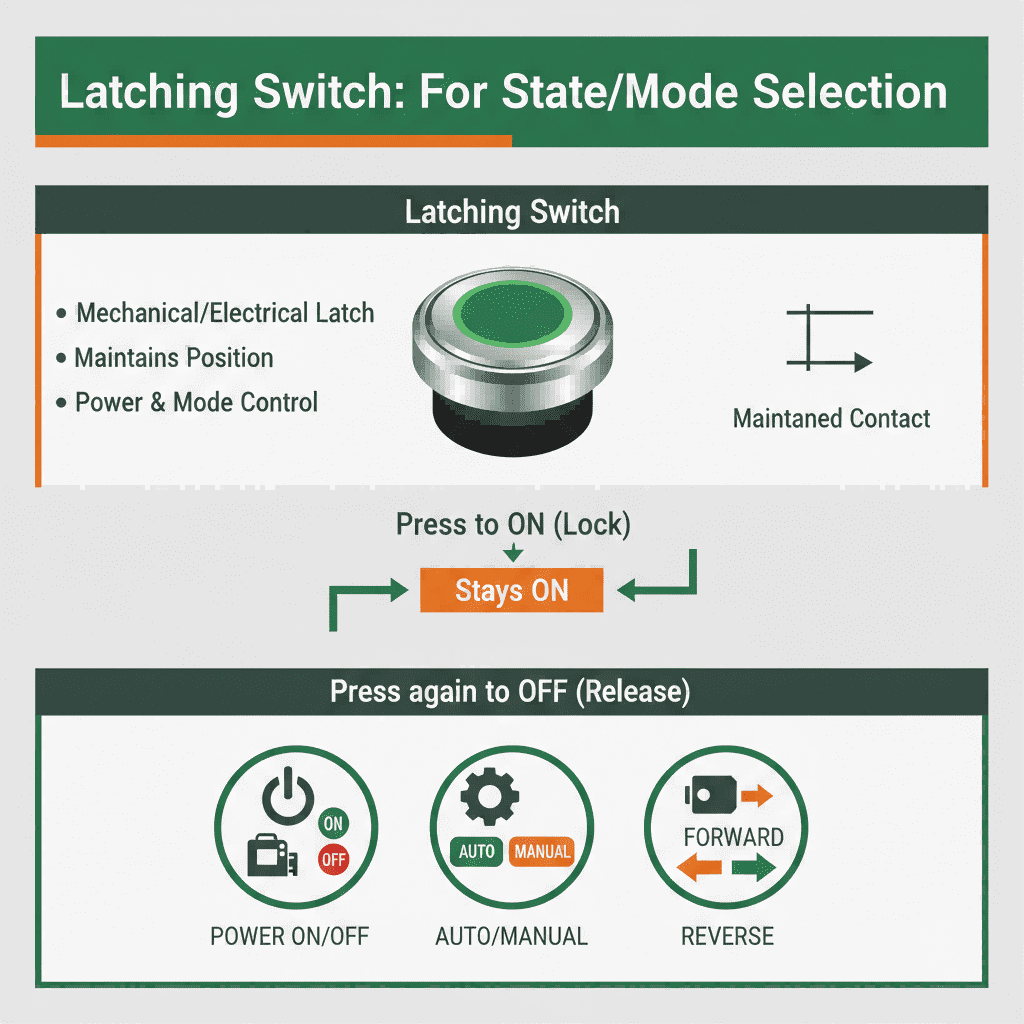
- Latching Push Button: Uses a mechanical locking mechanism (e.g., a detent or solenoid). A single press locks the contacts in the activated position, maintaining the circuit without continuous pressure. To reset, the button must be pressed again (or reset via a separate mechanism, like a key for safety applications).
2.2 Key Feature Comparison
| Feature | Momentary Push Button | Latching Push Button |
|---|---|---|
| Activation State | Temporary (only while pressed) | Permanent (locks after press) |
| Reset Method | Automatic (spring return) | Manual (second press or key reset) |
| Circuit Behavior | Triggers short-duration actions | Maintains continuous circuit state |
| Industrial Use Case | Temporary operations, momentary controls | Continuous run/stop, state retention |
| Safety Design | Often used for “hold-to-operate” functions | Ideal for lock-in safety circuits |
2.3 Functional Limits to Consider
- Momentary switches cannot maintain a circuit on their own—they require external relays or controllers for prolonged operations.
- Latching switches may pose risks if not paired with proper safety interlocks (e.g., a latching emergency stop button needs a key reset to prevent accidental reactivation).
3. Industrial Applications: When to Use Each Type (with Case Studies)
The right switch depends on the task at hand. Below are common industrial scenarios—paired with real-world case studies—where momentary or latching push buttons are the optimal choice:
3.1 Momentary Push Button Applications
Momentary switches excel in tasks that require temporary activation or operator presence to function. Key industrial uses include:
3.1.1 Jog Controls for Precision Machinery
- Use Case: Positioning heavy equipment or robotic arms where precise, short bursts of movement are needed. Operators must hold the button to keep the machine in motion, ensuring immediate stop if hazards arise.
- Case Study: A German automotive assembly plant uses 22mm momentary push buttons (Siemens 3SU1 series) for robotic welding arm jog controls. Workers hold the button to maneuver the arm into welding positions—releasing it stops movement instantly. This design reduced accidental collisions by 70% compared to the previous latching system, as operators maintain direct control over the arm’s movement.
3.1.2 Emergency Stop (E-Stop) Circuits
- Use Case: Halting machinery during hazards. Most industrial e-stop buttons are momentary NC switches—pressing breaks the circuit, and releasing resets it for quick recovery.
- Case Study: A food packaging facility in the U.S. installed IDEC’s AL Series momentary e-stop buttons on its conveyor lines. During a 2024 incident where a product jammed, an operator pressed the e-stop, stopping the line immediately. The momentary design allowed the team to reset the switch and restart production within 10 minutes—avoiding prolonged downtime that would have occurred with a latching e-stop (which requires a separate reset step).
3.1.3 Pulse Signal Triggers
- Use Case: Initiating one-time actions like starting a production cycle, resetting sensors, or activating valves.
- Case Study: A pharmaceutical manufacturer uses Schneider Electric’s XB5 momentary push buttons to trigger the filling process for medication vials. Operators press the button once to start a single batch fill— the switch’s momentary action ensures the process only runs for the pre-programmed cycle (no continuous activation). This reduced overfilling errors by 45% by preventing accidental prolonged activation.
3.1.4 Hold-to-Run Equipment
- Use Case: Small machinery or test benches that require constant operator oversight to prevent unattended operation.
- Case Study: A lab equipment supplier uses 16mm mini momentary push buttons for its benchtop mixers. Operators must hold the button to run the mixer—releasing it stops the device. This design complies with laboratory safety standards, as it prevents the mixer from running unattended (a common cause of sample contamination in previous setups).
3.2 Latching Push Button Applications
Latching switches are ideal for functions that require continuous operation or state retention without operator intervention. Key industrial uses include:
3.2.1 Machine Start/Stop for Continuous Production
- Use Case: Starting production lines, pumps, or conveyors that run continuously until intentionally stopped.
- Case Study: A beverage bottling plant in Brazil uses latching push buttons (Schneider Electric XB4 series) to control its bottling lines. Operators press once to start the line— which runs until the latching stop button is pressed. This eliminated the need for constant operator input during 8-hour production shifts, increasing throughput by 20% compared to the old momentary system (where operators had to periodically re-press the button).
3.2.2 Operational Mode Selection
- Use Case: Switching between “Auto” and “Manual” modes on assembly lines or process equipment.
- Case Study: A electronics manufacturer in South Korea uses Siemens latching push buttons to toggle between automated and manual operation on its circuit board assembly line. When in “Auto” mode, the latching switch retains the setting until pressed again—allowing the line to run unattended during overnight shifts. This flexibility reduced changeover time between modes by 30 minutes per shift.
3.2.3 Alarm Reset & Lockout
- Use Case: Silencing industrial alarms after resolving issues, or locking out equipment during maintenance.
- Case Study: A chemical plant in Germany uses key-latching push buttons (ABB CP1 series) for alarm reset and maintenance lockout. When an alarm triggers, operators resolve the issue and press the latching button to silence the alarm (it stays silenced until reset). For maintenance, workers press the button to cut power— the key reset ensures no one restarts the equipment while workers are inside. This design reduced false alarms by 60% and eliminated 2 near-miss incidents in 2024.
3.2.4 Backup System Activation
- Use Case: Activating backup generators, pumps, or cooling systems that need to run continuously during power outages or equipment failures.
- Case Study: A data center in Singapore uses latching push buttons to activate backup cooling units. During a grid power fluctuation in 2024, operators pressed the latching button to start the backup system— which ran continuously until the main power was restored. The latching design ensured the cooling units didn’t shut off accidentally, preventing overheating of critical servers (which would have cost an estimated $50,000 in downtime).
4. Step-by-Step Selection Process for Industrial Use
Follow these four steps to choose between momentary and latching push buttons for your industrial application:
4.1 Step 1: Define the Operational Requirement
Ask: Does the function require temporary activation or continuous state retention?
- If the action needs to stop when the operator releases the button (e.g., jogging, emergency stop), choose a momentary push button.
- If the action needs to continue after the button is released (e.g., machine run mode), choose a latching push button.
4.2 Step 2: Evaluate Safety Needs
Industrial environments demand switches that align with safety standards (e.g., IEC 60947):
- For emergency shutdowns or functions requiring operator presence, use a momentary NC push button (failsafe design—breaks the circuit when pressed).
- For lockout/tagout or mode selection where accidental reset is a risk, use a latching push button with key reset (prevents unauthorized activation).
4.3 Step 3: Consider Circuit Design
- Momentary switches work best with circuits that require pulse signals or rely on external relays for latching (e.g., PLC-controlled systems).
- Latching switches eliminate the need for external relays in simple circuits, reducing component count and potential failure points.
4.4 Step 4: Match to Environmental & Mechanical Requirements
Industrial settings often involve harsh conditions—ensure the switch fits the environment:
- Mount Size: 22mm and 30mm are standard for industrial panels; 16mm for compact equipment.
- IP Rating: Choose waterproof push buttons (IP65/IP67) for wet or dusty environments (e.g., marine, outdoor machinery).
- Material: Metal push buttons for rugged applications; plastic for standard industrial use.
- Illumination: Illuminated push buttons (LED) for low-light areas (e.g., control rooms, night shifts) to indicate switch state.
Example Selection Workflow: A maintenance team needs a switch to start a ventilation fan in a chemical plant. The fan runs continuously until stopped, so a latching switch is chosen. It requires a 22mm mount, IP67 waterproof rating (due to chemical dust), and red illumination to indicate when the fan is active.
5. Common Mistakes to Avoid
Even experienced teams make selection errors—here are the top pitfalls to steer clear of:
5.1 Using Latching Switches for Emergency Stops
Emergency stop circuits require momentary NC switches. Latching e-stop buttons can trap the circuit in the “off” state, delaying recovery, or fail to reset properly in critical situations. For example, a textile mill once used latching e-stops—during a fire, operators couldn’t reset the switches quickly, leading to extended downtime.
5.2 Overlooking Circuit Compatibility
Momentary switches may not work with simple circuits that lack relays. For example, a momentary button can’t power a motor directly—you’ll need a latching relay or PLC to maintain the circuit. A small workshop learned this the hard way when they installed momentary buttons for their dust collection system— the motor shut off as soon as the button was released.
5.3 Ignoring Environmental Ratings
Using a non-waterproof push button in a wet industrial environment (e.g., washdown areas) leads to corrosion and switch failure. A dairy processing plant replaced 50% of its non-waterproof momentary buttons within 6 months— switching to IP67-rated switches reduced replacement costs by 80%.
5.4 Choosing the Wrong Contact Type
- Use NO momentary switches for “start” functions (completes the circuit when pressed).
- Use NC momentary switches for “stop” or emergency functions (breaks the circuit when pressed).
- Latching switches can be NO or NC, but ensure the contact type aligns with your circuit’s default state. A car parts manufacturer once used NC latching switches for machine start— the circuit was broken until the button was pressed, causing confusion and delayed startups.
6. Conclusion & Reference Resources
Choosing between momentary and latching push buttons boils down to understanding operational needs, safety requirements, and circuit design. Momentary switches excel at temporary actions and operator-dependent functions (as seen in jog controls and e-stops), while latching switches are ideal for continuous operation and state retention (such as production line start/stop and mode selection).
Key takeaways:
- Momentary = temporary activation (spring return) – use for jogging, e-stops, and pulse actions.
- Latching = permanent state (locks after press) – use for machine run/stop, mode selection, and alarm reset.
- Real-world case studies confirm that aligning switch type with application reduces downtime, improves safety, and boosts efficiency.
- Always match safety standards, environmental ratings, and contact type with your industrial application.
By following the step-by-step selection process, you’ll avoid costly downtime, safety hazards, and equipment malfunctions.
Appendix: Key Reference Resources
- IEC 60947-5-1: Standard for Industrial Push Button Switches
- National Electrical Manufacturers Association (NEMA): Push Button Switch Guidelines
- Schneider Electric: Momentary vs. Latching Push Button Application Guide
- Siemens: Industrial Push Button Selection Technical Datasheet
- IDEC: Push Button Switch Environmental and Safety Ratings
- ABB: Latching Push Button Lockout/Tagout Best Practices