
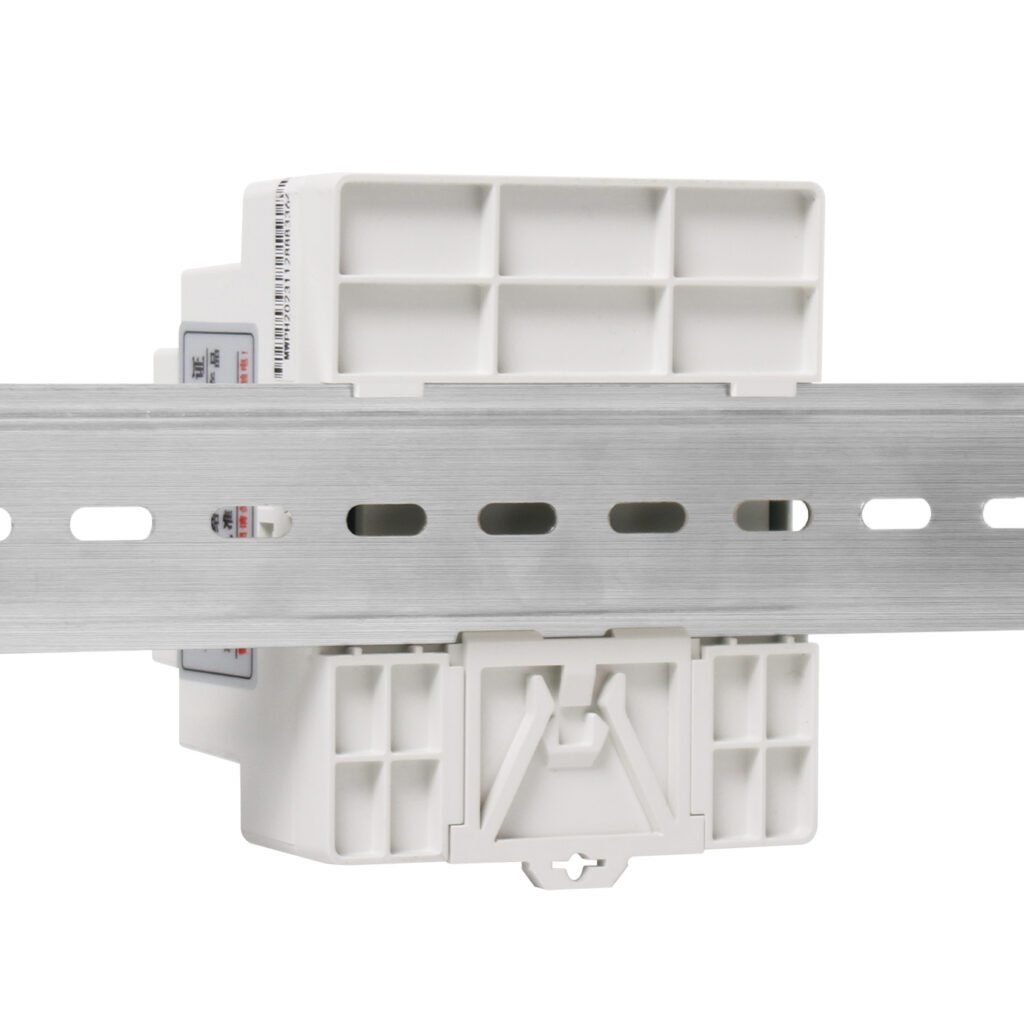
Introduction: Understanding DIN Rail Power Supplies
A DIN rail power supply represents the industry standard for mounting industrial power conversion devices in control cabinets, automation systems, and electrical enclosures. This comprehensive guide explains what these essential components are and provides detailed, step-by-step instructions for proper installation, ensuring reliable operation in industrial environments.
1. What is a DIN Rail Power Supply?
Basic Definition and Purpose
A DIN rail power supply is a power conversion device specifically designed for mounting on standardized metal rails within industrial control systems. These units convert incoming AC or DC voltage to regulated DC output, typically 12V, 24V, or 48V, for powering PLCs, sensors, relays, and other industrial equipment.
Key Characteristics:
Standardized Mounting: Designed for specific rail profiles
Industrial Grade: Built for harsh environments
Compact Design: Optimized for space efficiency
Easy Installation: Tool-free or minimal-tool mounting
Historical Background
DIN Standard Origin: DIN stands for “Deutsches Institut für Normung” (German Institute for Standardization), which established the standardized rail system. Initially developed in Germany, this system gained global acceptance due to its efficiency and reliability.
Evolution Timeline:
1970s: Introduction in European industrial applications
1980s: Expansion to global markets
1990s: Standardization of rail profiles and mounting
2000s-Present: Integration with smart technologies and miniaturization
Types of DIN Rail Power Supplies
By Mounting Style:
Snap-on Design: Spring-loaded clips for quick mounting
Screw-mounted: Additional security for high-vibration environments
Combination: Both snap and screw options available
By Rail Type:
TH35-7.5: 35mm wide, 7.5mm height (most common)
TH35-15: 35mm wide, 15mm height (for heavier units)
G32: 32mm wide for specific applications
Multi-standard: Compatible with multiple rail types
2. Components and Design Features
Physical Components
Main Housing: Typically metal (aluminum or steel) for heat dissipation and durability. Some units feature plastic housings for specific applications.
Terminal Blocks:
Input Terminals: For AC or DC power connection
Output Terminals: For DC output to connected devices
Auxiliary Terminals: For monitoring, control, or communication
Mounting Mechanism:
Upper Clip: Hooks onto rail top edge
Lower Clip: Spring-loaded for secure engagement
Locking Screw: Optional additional security
Status Indicators:
Power LED: Green indicates normal operation
Alarm LED: Red indicates fault condition
Load Indicators: Visual load level indicators on some models
Technical Specifications
Common Specifications:
Input Voltage: Typically 85-264VAC (wide range)
Output Voltage: 12V, 24V, or 48V DC standard
Output Current: 1A to 40A common ranges
Efficiency: 85-95% typical
Protection: Overvoltage, overcurrent, short circuit, overtemperature
Temperature Range: -25°C to +70°C industrial standard
Certification Marks:
CE: European compliance
UL/CSA: North American safety standards
RoHS: Restriction of hazardous substances
Industry Specific: Additional certifications for special applications
3. Advantages of DIN Rail Mounting
Space Efficiency
Compact Design: DIN rail power supplies maximize vertical space utilization in control cabinets. Compared to chassis-mounted alternatives, they typically occupy 30-50% less space while delivering equivalent power.
Modular Arrangement: Multiple devices can be mounted side-by-side on the same rail, creating organized, efficient layouts. This modularity allows for easy system expansion and reconfiguration.
Installation Benefits
Quick Mounting: Most units install in seconds with simple snap-on mechanisms. This rapid installation significantly reduces labor costs compared to traditional mounting methods.
Standardized Layout: Consistent mounting across different manufacturers simplifies system design and maintenance. Technicians familiar with one system can easily work with others.
Easy Maintenance: Units can be quickly removed and replaced without disturbing adjacent components or extensive rewiring. This modularity minimizes downtime during service operations.
Industrial Suitability
Vibration Resistance: Secure rail mounting provides excellent resistance to industrial vibrations, ensuring reliable operation in demanding environments.
Thermal Management: Standardized spacing allows for optimal airflow, while metal housings facilitate heat dissipation through the mounting rail.
Safety Compliance: Designed to meet industrial safety standards with proper clearances, insulation, and protection features integrated into the design.
4. Tools and Materials Required for Installation
Essential Tools
Basic Hand Tools:
Screwdrivers: Phillips and flathead varieties
Wire Strippers: For preparing connections
Crimping Tool: For terminal connectors
Multimeter: For voltage and continuity testing
Torque Screwdriver: For precise terminal tightening
Specialized Tools:
DIN Rail Cutter: For cutting rails to length
End Stops: To secure rail ends
Mounting Brackets: For rail support
Label Maker: For circuit identification
Materials Needed
Electrical Components:
DIN Rail: TH35-7.5 or TH35-15 profile
Wire: Appropriate gauge for current rating
Terminals: Ferrules or spade connectors
Fuses/Circuit Breakers: Input protection devices
Grounding Components: Proper grounding materials
Safety Equipment:
Safety Glasses: Eye protection
Insulated Gloves: Electrical safety
Voltage Tester: Live circuit verification
Lockout/Tagout Equipment: For working on energized systems
Installation Aids:
Mounting Screws: For securing rail to enclosure
Cable Ties: For wire management
Wire Duct: For organized wiring
Labels: For circuit identification
5. Step-by-Step Installation Guide
Step 1: Planning and Preparation
Site Assessment: Before installation, evaluate the control cabinet or enclosure. Check available space, mounting surface suitability, and proximity to other components.
Power Supply Selection: Choose the appropriate DIN rail power supply based on:
Voltage Requirements: Match to connected devices
Current Capacity: Include 20-30% safety margin
Environmental Conditions: Temperature, humidity, vibration
Certification Needs: Industry-specific requirements
Layout Planning: Plan component arrangement on the rail, considering:
Clearance Requirements: Manufacturer-specified spacing
Heat Management: Position heat-generating units appropriately
Wiring Access: Ensure adequate space for connections
Future Expansion: Leave room for additional components
Step 2: DIN Rail Installation
Rail Selection: Choose the correct rail profile (typically TH35-7.5 for standard power supplies). Ensure the rail length accommodates all planned components with adequate spacing.
Mounting Surface Preparation:
Clean the mounting surface thoroughly
Mark mounting hole locations according to planned layout
Drill holes if necessary, using appropriate size for mounting hardware
Deburr holes and clean metal shavings
Rail Mounting Procedure:
Position the rail against the mounting surface
Secure one end with mounting screws, ensuring level alignment
Install remaining screws at recommended intervals (typically 200-300mm)
Verify secure mounting with gentle pressure test
Install end stops if required by application
Step 3: Power Supply Mounting
Pre-Mounting Checks:
Verify power supply specifications match requirements
Check for shipping damage or defects
Review manufacturer’s installation instructions
Ensure all mounting components are present
Mounting Procedure:
Positioning: Align power supply with desired rail location
Upper Clip Engagement: Hook upper mounting clip onto rail top edge
Lower Clip Engagement: Press unit downward until lower clip snaps into place
Secure Check: Verify unit is firmly seated by gentle upward pull
Optional Locking: Install locking screw if provided for additional security
Spacing Considerations:
Vertical Clearance: Minimum 10mm above and below unit
Horizontal Spacing: Minimum 5mm between adjacent units
Ventilation: Ensure adequate airflow around unit
Accessibility: Maintain service access to terminals
Step 4: Electrical Connections
Safety Precautions:
Power Off: Ensure all power sources are disconnected
Lockout/Tagout: Implement proper safety procedures
Voltage Verification: Test for absence of voltage before proceeding
Personal Protection: Wear appropriate safety equipment
Input Wiring Procedure:
Wire Preparation: Strip wire to appropriate length (typically 8-10mm)
Terminal Preparation: Install ferrules if required by manufacturer
Connection: Insert wire into terminal block
Tightening: Torque to manufacturer’s specification (typically 0.5-0.8 Nm)
Tug Test: Gently pull wire to verify secure connection
Output Wiring Procedure:
Circuit Planning: Plan wiring routes to connected devices
Wire Sizing: Select appropriate gauge for current and distance
Connection Sequence: Connect farthest devices first
Grounding: Ensure proper equipment ground connection
Labeling: Clearly label all circuits for future reference
Wiring Best Practices:
Color Coding: Use standard colors (brown/blue for AC, red/black for DC)
Strain Relief: Provide proper cable strain relief
Separation: Keep AC and DC wiring separated
Routing: Use wire ducts for organized installation
Documentation: Create wiring diagrams for future reference
Step 5: Testing and Commissioning
Pre-Energization Checks:
Visual Inspection: Verify all connections are secure
Continuity Test: Check for short circuits or incorrect wiring
Insulation Test: Verify insulation integrity if equipment available
Protection Verification: Confirm proper fusing and circuit protection
Initial Power-Up:
Apply Input Power: Energize input circuit
Status Indicator Check: Verify power LED illuminates
Output Voltage Measurement: Check voltage at output terminals
Load Testing: Gradually apply load while monitoring performance
Performance Verification:
Voltage Regulation: Measure under various load conditions
Temperature Check: Monitor temperature during operation
Noise Level: Listen for abnormal sounds
Protection Test: Verify protection features if safe to do so
Documentation:
Record Measurements: Document all test results
Update Drawings: Mark as-built conditions
Create Maintenance Log: Initial entry for future reference
User Instructions: Provide operating guidelines if applicable
6. Common Installation Mistakes and How to Avoid Them
Electrical Errors
Incorrect Wire Sizing:
Mistake: Using undersized wire for current requirements
Consequence: Overheating, voltage drop, potential fire hazard
Prevention: Calculate proper wire gauge using NEC/IEC tables
Improper Grounding:
Mistake: Inadequate or missing equipment ground
Consequence: Shock hazard, improper operation
Prevention: Always connect equipment ground terminal
Reverse Polarity:
Mistake: Reversing positive and negative connections
Consequence: Equipment damage, safety hazards
Prevention: Double-check polarity before energizing
Mechanical Errors
Insufficient Clearance:
Mistake: Installing units too close together
Consequence: Overheating, reduced lifespan
Prevention: Follow manufacturer’s spacing recommendations
Improper Mounting:
Mistake: Incomplete clip engagement or missing screws
Consequence: Unit dislodgement, connection failures
Prevention: Verify secure mounting with gentle test
Vibration Issues:
Mistake: Inadequate support in high-vibration environments
Consequence: Connection loosening, premature failure
Prevention: Use additional mounting screws or vibration damping
Environmental Considerations
Temperature Management:
Mistake: Installing in overheated enclosures
Consequence: Thermal shutdown, reduced efficiency
Prevention: Ensure adequate ventilation and cooling
Moisture Exposure:
Mistake: Installing standard units in damp environments
Consequence: Corrosion, insulation breakdown
Prevention: Use appropriate IP-rated units for environment
Contaminant Protection:
Mistake: Exposing to dust or chemical contaminants
Consequence: Reduced performance, premature failure
Prevention: Select properly sealed units and enclosures
7. Maintenance and Troubleshooting
Regular Maintenance Procedures
Visual Inspections (Monthly):
Check for physical damage or discoloration
Verify all connections remain tight
Inspect for dust accumulation
Check status indicator operation
Performance Checks (Quarterly):
Measure output voltage under load
Check terminal temperatures with thermal camera or thermometer
Verify proper airflow around unit
Document measurements for trend analysis
Comprehensive Maintenance (Annual):
Clean unit and surrounding area
Retorque terminal connections to specifications
Test protection features if safe to do so
Review operating conditions and consider derating if necessary
Troubleshooting Common Issues
No Output Power:
Possible Causes: Input power loss, internal fault, protection activated
Diagnosis Steps: Check input voltage, verify fuses, reset unit if possible
Solutions: Restore input power, replace fuse, contact manufacturer if faulty
Low Output Voltage:
Possible Causes: Overload, input voltage low, wiring issues
Diagnosis Steps: Measure input voltage, check load current, inspect connections
Solutions: Reduce load, address input power issue, repair wiring
Overheating:
Possible Causes: Insufficient ventilation, overload, high ambient temperature
Diagnosis Steps: Check temperature, verify load, assess ventilation
Solutions: Improve airflow, reduce load, consider derating or relocation
Intermittent Operation:
Possible Causes: Loose connections, thermal protection, input power issues
Diagnosis Steps: Check all connections, monitor temperature, verify input power stability
Solutions: Secure connections, address cooling, stabilize input power
Safety Considerations During Maintenance
De-energization: Always disconnect power before performing maintenance
Lockout/Tagout: Implement proper safety procedures
Personal Protection: Use appropriate safety equipment
Qualified Personnel: Ensure technicians are properly trained
Documentation: Record all maintenance activities
8. Advanced Installation Considerations
Multiple Unit Installations
Load Balancing: When installing multiple power supplies, distribute loads evenly to prevent overloading individual units. Consider total cabinet load and thermal management implications.
Parallel Operation: Some units support parallel operation for redundancy or increased capacity. Follow manufacturer’s specific guidelines for parallel connections, including current sharing and synchronization requirements.
Master-Slave Configuration: Advanced systems may use master-slave arrangements for coordinated operation. Ensure proper configuration and communication between units.
Special Environmental Conditions
High Vibration Environments:
Use additional mounting screws
Consider vibration-damping mounts
Specify units with enhanced vibration resistance
Implement more frequent maintenance checks
Extreme Temperatures:
Select units with extended temperature ranges
Implement active cooling if necessary
Consider derating according to temperature
Monitor temperature continuously
Corrosive Atmospheres:
Use units with appropriate protective coatings
Select corrosion-resistant materials
Implement regular cleaning schedules
Consider sealed enclosures
Integration with Control Systems
Monitoring Interfaces: Many modern DIN rail power supplies include communication interfaces (MODBUS, Ethernet, etc.) for integration with control systems. Proper installation includes connection to these interfaces and configuration of monitoring parameters.
Remote Management: For systems with remote management capabilities, ensure proper network connections and security configurations. Document IP addresses, passwords, and access procedures.
Alarm Integration: Connect alarm outputs to control systems for immediate notification of fault conditions. Test alarm functionality during commissioning.
9. Frequently Asked Questions (FAQ)
Q1: What does “DIN” stand for in DIN rail power supply?
A: DIN stands for “Deutsches Institut für Normung” (German Institute for Standardization). This organization established the standardized rail mounting system that has become globally accepted in industrial applications.
Q2: Can I mount any power supply on a DIN rail?
A: Only power supplies specifically designed for DIN rail mounting should be installed on DIN rails. Attempting to mount non-compatible units can result in insecure mounting, poor heat dissipation, and safety hazards.
Q3: How much weight can a DIN rail support?
A: Weight capacity depends on rail type, mounting method, and manufacturer specifications. Generally, TH35-7.5 rails support 5-7kg per 100mm with proper mounting. Always check manufacturer specifications and consider distributed weight across multiple mounting points.
Q4: Do I need special tools to install DIN rail power supplies?
A: Basic hand tools are typically sufficient. However, specialized tools like DIN rail cutters, terminal crimpers, and torque screwdrivers can improve installation quality and efficiency.
Q5: How often should DIN rail power supplies be maintained?
A: Maintenance frequency depends on operating environment and criticality. General guidelines: visual inspection monthly, performance check quarterly, comprehensive maintenance annually. Increase frequency in harsh environments or critical applications.
Q6: Can DIN rail power supplies be installed outdoors?
A: Only units with appropriate environmental ratings (typically IP65 or higher) should be installed outdoors. Standard units are designed for protected indoor environments. Always verify IP rating and temperature specifications for outdoor installations.
Q7: What’s the difference between TH35-7.5 and TH35-15 rails?
A: TH35-7.5 rails are 35mm wide with 7.5mm height, suitable for most standard components. TH35-15 rails are also 35mm wide but have 15mm height, providing additional strength for heavier components or high-vibration environments.
Q8: How do I know if my DIN rail power supply is properly mounted?
A: Properly mounted units should be securely seated with all clips engaged. Perform a gentle upward pull test – the unit should not dislodge. For critical applications, use optional locking screws if provided by the manufacturer.
10. Professional Tips and Best Practices
Installation Excellence
Planning Phase:
Always start with detailed planning and measurement
Consider future expansion during initial installation
Create installation checklists and follow them systematically
Document everything for future reference
Quality Focus:
Never compromise on wire quality or connection methods
Use proper torque tools for terminal connections
Implement consistent labeling from the start
Verify every connection before energization
Safety Emphasis:
Always follow lockout/tagout procedures
Use personal protective equipment consistently
Test for dead before working on circuits
Never bypass safety features or protections
Efficiency Improvements
Time-Saving Techniques:
Pre-assemble components when possible
Use prefabricated wiring harnesses for multiple units
Implement modular designs for easier maintenance
Standardize installation procedures across projects
Cost Optimization:
Right-size components to avoid overspending
Consider total cost of ownership, not just purchase price
Implement preventive maintenance to avoid costly repairs
Train personnel properly to reduce installation errors
Performance Enhancement:
Implement proper cooling from the start
Use monitoring systems for early fault detection
Regular calibration and verification of performance
Keep detailed performance records for trend analysis
Continuous Improvement
Learning Culture:
Document lessons learned from each installation
Share best practices across installation teams
Stay updated with new products and techniques
Participate in manufacturer training when available
Technology Adoption:
Implement digital tools for installation documentation
Use thermal imaging for preventive maintenance
Adopt smart monitoring systems where beneficial
Stay informed about industry trends and innovations
Quality Assurance:
Implement peer review of installations
Develop standard operating procedures
Conduct regular quality audits
Seek customer feedback for improvement opportunities
Conclusion: Mastering DIN Rail Power Supply Installation
DIN rail power supply installation combines technical knowledge, practical skills, and attention to detail. By understanding what these essential components are and following systematic installation procedures, you can ensure reliable, efficient, and safe power distribution in industrial applications.
Key Takeaways:
Understanding is Foundation: Know what DIN rail power supplies are and how they differ from other mounting styles
Preparation is Crucial: Proper planning and tool preparation set the stage for successful installation
Procedure Matters: Follow step-by-step installation methods for consistent results
Safety is Paramount: Always prioritize safety procedures and personal protection
Quality Endures: Attention to detail during installation pays dividends in long-term reliability
Maintenance Sustains: Regular maintenance ensures continued optimal performance
Documentation Supports: Complete records aid future maintenance and troubleshooting
Final Recommendations:
Start with Training: Ensure installers understand both theoretical and practical aspects
Use Quality Components: Never compromise on the quality of power supplies or installation materials
Follow Standards: Adhere to industry standards and manufacturer recommendations
Verify Everything: Double-check connections, clearances, and performance
Plan for Future: Consider expansion and maintenance access during initial installation
Professional Installation Support: For complex installations or specialized applications, consider engaging professional installation services. Experienced technicians bring valuable expertise and can ensure optimal results for critical power systems.
Need Installation Assistance? Contact our technical support team for guidance on DIN rail power supply installation specific to your application. We provide installation guidelines, technical specifications, and expert advice to ensure successful implementation of your power distribution systems.