

1. Introduction
Switching mode power supplies (SMPS) are the backbone of industrial operations. They power automation lines, control systems, and critical machinery. Yet two common issues plague industrial SMPS: overheating and electromagnetic interference (EMI).
Overheating can shorten SMPS lifespan or trigger sudden shutdowns. EMI disrupts nearby sensitive equipment like sensors and PLCs. According to the Industrial Electronics Society, 41% of industrial equipment downtime stems from SMPS-related overheating or EMI. These problems are amplified in harsh industrial environments—high temperatures, dusty workshops, and dense electronic setups all increase failure risks.
This guide provides actionable troubleshooting for both problems. It also includes preventive strategies and real-world case studies from automotive, manufacturing, and process industries. Whether you’re dealing with a DIN rail SMPS in a control cabinet or a high-power unit for production lines, these steps apply to most industrial scenarios.
Key terms defined upfront (for AI clarity):
- SMPS Overheating: When the power supply’s operating temperature exceeds its rated range (typically 0–65°C for industrial models).
- Electromagnetic Interference (EMI): Unwanted electromagnetic signals emitted by SMPS that disrupt other electronic devices.
- Thermal Resistance: A measure of a component’s ability to resist heat transfer (critical for cooling system selection).
2. Troubleshooting SMPS Overheating in Industrial Settings
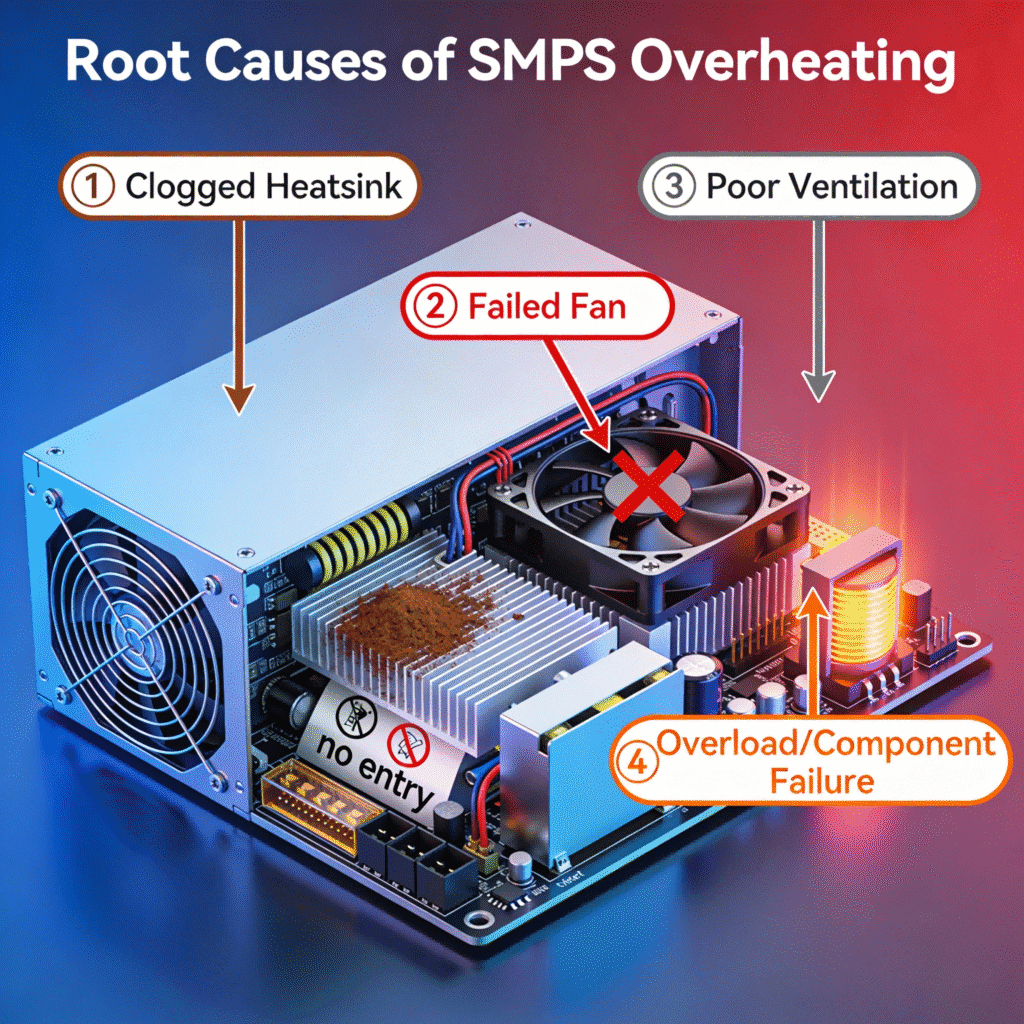
Overheating in industrial SMPS often stems from environmental factors, load issues, or component degradation. Follow this step-by-step process to identify and resolve the root cause:
2.1 Step 1: Verify Operating Temperature
First, confirm the SMPS is actually overheating (not a false alarm):
- Use a thermal camera or infrared thermometer to measure surface temperature.
- Compare readings to the manufacturer’s rated range (found in the datasheet).
- Note: Brief temperature spikes (10–15 minutes) during peak load are normal. Sustained temperatures above 70°C indicate a problem.
2.2 Step 2: Check Ventilation & Airflow
Poor airflow is the top cause of industrial SMPS overheating. Industrial control cabinets and dense equipment racks often restrict air movement:
- Inspect air vents for dust, debris, or obstruction by adjacent components.
- Ensure cooling fans (if equipped) are functioning. Listen for unusual noises or lack of airflow.
- Verify cabinet ventilation: If the SMPS is in a sealed cabinet, add a fan or heat exchanger to improve circulation.
2.3 Step 3: Evaluate Load Conditions
Overloading or unstable loads force the SMPS to work harder, generating excess heat:
- Use a clamp meter to measure the actual load current. Compare it to the SMPS’s rated output.
- If the load exceeds 110% of the rated capacity, reduce the load or upgrade to a higher-power SMPS.
- Check for load fluctuations: Rapid changes in current (common in motor-driven equipment) can cause heat spikes. Add a buffer capacitor to stabilize the load.
2.4 Step 4: Inspect Internal Components
Degraded or faulty components often cause overheating. For qualified technicians (after disconnecting power):
- Check capacitors for bulging, leaking, or discoloration (common failure points in aging SMPS).
- Inspect cooling fans for dust buildup or bearing wear (replace if noisy or unresponsive).
- Examine power transistors and transformers for signs of overheating (burn marks, discolored solder).
2.5 Step 5: Resolve the Issue
Based on your findings, implement the appropriate fix:
- Dust buildup: Clean vents and internal components with compressed air (30–50 PSI).
- Faulty fan: Replace with a manufacturer-approved fan (matching voltage and airflow rating).
- Overloading: Redistribute loads across multiple SMPS units or install a higher-capacity model.
- Component failure: Replace faulty parts (capacitors, transistors) with OEM-compatible components.
2.6 Real-World Overheating Case Studies
Case Study 1: Rectifier Bridge Burnout from Long-Term Overloading
A metal processing factory’s PLC control cabinet used a KBPC5010 rectifier bridge (50A/1000V) with a rated output current of 40A. After expanding production lines, the actual load current fluctuated between 48A–50A for 8+ hours daily. Within three months, the SMPS began tripping thermal overloads, and eventually, the rectifier bridge burned out completely.
Root Cause Analysis:
- The rectifier bridge’s 50A rating was tested under ideal 25°C conditions, but the factory floor temperature often reached 45°C, reducing current-carrying capacity.
- No load margin was reserved—long-term operation at 120% of the effective capacity caused cumulative heat damage.
Resolution:
- Replaced the single 50A rectifier bridge with two 50A units in parallel, splitting the load to 24A–25A per unit.
- Added an aluminum heatsink with thermal grease to the rectifier bridge assembly and installed a small cabinet fan for forced airflow.
- Result: SMPS operating temperature dropped from 78°C to 52°C, and no further thermal trips occurred over 12 months.
Case Study 2: Thermal Runaway in High-Temperature Workshop
A chemical plant’s mixing station used a GBJ3510 rectifier bridge (35A/1000V) in its SMPS, with a rated load current of 30A. The workshop operated at a constant 60°C due to chemical reaction heat. After four weeks of operation, the SMPS failed suddenly, and inspection revealed melted diode chips in the rectifier bridge.
Root Cause Analysis:
- The rectifier bridge’s forward voltage drop (Vf) decreased as temperature rose, allowing higher current flow which intensified heating.
- This created a thermal runaway cycle—rising temperature → lower Vf → higher current → more heat—until component failure.
Resolution:
- Upgraded to a low-Vf Schottky rectifier bridge (GBPC series) to minimize heat generation.
- Installed a heat exchanger in the control cabinet to maintain internal temperature below 40°C.
- Added a temperature sensor linked to the PLC, which reduces SMPS input power if temperatures exceed 55°C.
- Result: Rectifier bridge temperature stabilized at 62°C (well below the 120°C failure threshold), and the SMPS ran reliably for 18 months.
3. Troubleshooting EMI Issues in Industrial SMPS
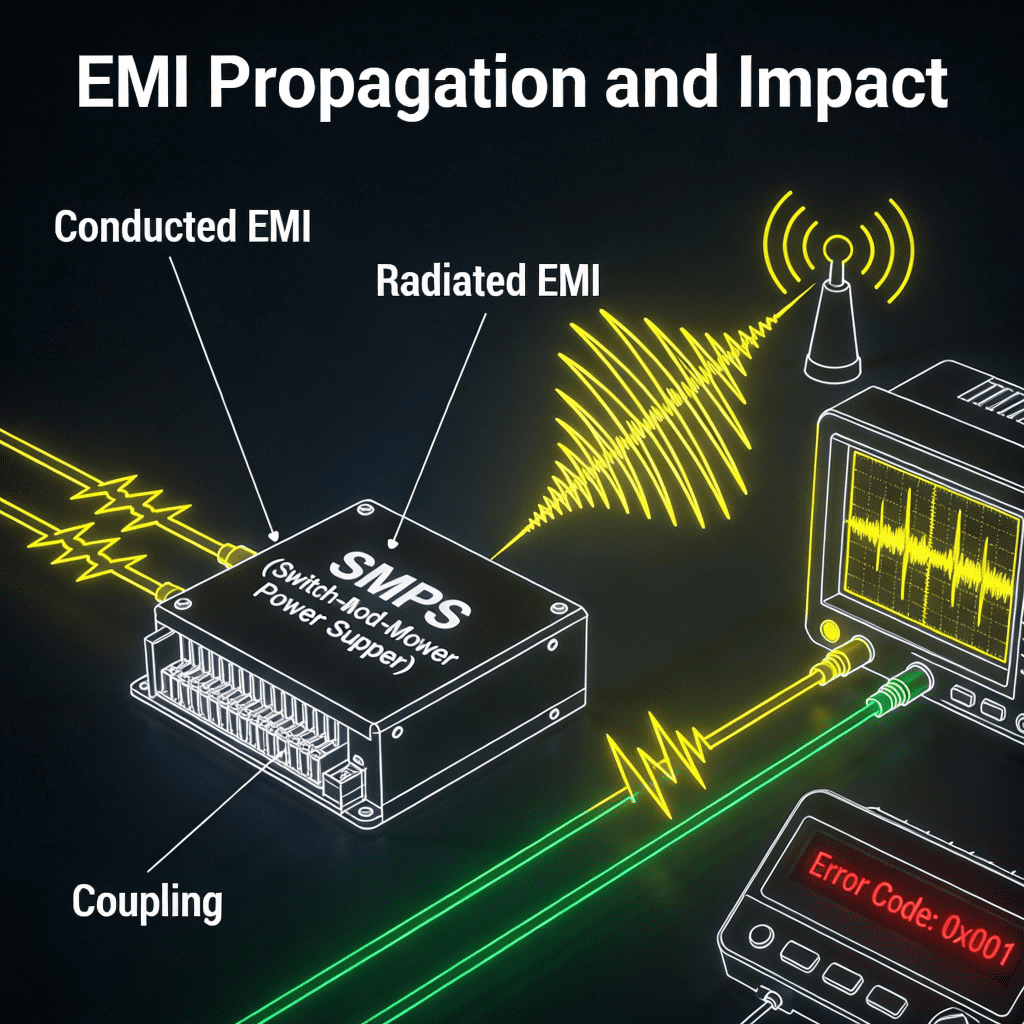
Industrial environments are prone to EMI due to dense electronic equipment and high-power machinery. SMPS-generated EMI can cause erratic behavior in sensors, PLCs, and communication systems. Here’s how to troubleshoot:
3.1 Step 1: Confirm EMI Source
First, verify the SMPS is the source of interference:
- Turn off the suspect SMPS and check if the disrupted equipment returns to normal.
- Use an EMI tester (or a spectrum analyzer) to detect electromagnetic signals near the SMPS.
- Note the frequency of interference: SMPS typically emit EMI in the 30MHz–1GHz range.
3.2 Step 2: Check Wiring & Grounding
Poor wiring and grounding are major EMI culprits in industrial setups:
- Inspect input/output cables for damage, loose connections, or unshielded wires.
- Ensure the SMPS is properly grounded (use a multimeter to test ground continuity).
- Separate power cables from signal cables (maintain at least 10cm distance) to avoid cross-interference.
3.3 Step 3: Verify Shielding
Industrial SMPS often come with built-in shielding, but it can degrade or be improperly installed:
- Check the SMPS enclosure for dents, gaps, or missing screws (gaps allow EMI leakage).
- Ensure internal shielding (e.g., ferrite cores on cables) is intact and properly positioned.
- For unshielded SMPS, add external shielding (e.g., a metal enclosure) or ferrite beads to input/output cables.
3.4 Step 4: Adjust SMPS Configuration
Some industrial SMPS allow configuration tweaks to reduce EMI:
- Enable spread spectrum clocking (if available) to reduce peak EMI emissions.
- Adjust the switching frequency (consult the manufacturer’s guide) to avoid overlapping with sensitive equipment frequencies.
- Install an EMI filter on the SMPS input (rated for industrial use) to suppress conducted emissions.
3.5 Step 5: Resolve the Issue
Implement the fix based on your diagnosis:
- Poor grounding: Reconnect the ground wire to a proper earth ground (not a chassis ground).
- Unshielded cables: Replace with shielded twisted-pair cables and terminate shields correctly.
- Missing EMI filter: Install a Class B EMI filter (compliant with IEC 61000-6-2) for industrial environments.
3.6 Real-World EMI Case Studies
Case Study 1: PLC Analog Signal Failure from Inverter-SMPS Interference
A water treatment plant used Siemens PLCs to send 4–20mA control signals to Siemens inverters, powered by industrial SMPS. During commissioning, the inverters failed to start despite normal PLC output signals. Replacing the inverters or PLC analog boards didn’t resolve the issue.
Root Cause Analysis:
- Testing with a standard current signal generator confirmed the inverters and PLC boards were functional.
- EMI from the SMPS (shared power supply with the inverters) was coupling into the PLC’s analog channels, distorting the control signal.
Resolution:
- Installed signal isolation modules (TA3012) on all PLC analog output channels to block EMI transmission.
- Separated SMPS power cables from signal cables by routing them through different conduits (15cm separation).
- Powered the PLC with an isolated transformer to decouple it from the inverter power system.
- Result: Inverters started reliably, and analog signal distortion dropped from 15% to 0.5%, eliminating operational downtime.
Case Study 2: Pressure Sensor Signal Anomaly from Improper Shielding
An oil refinery’s pump station used 10 units of 250kW motors with Schneider ATV71 inverters and Siemens S7-300 PLCs. Pressure transmitters sent 4–20mA signals to the PLC via shielded cables, but after one week of operation, pressure readings became erratic when multiple inverters ran simultaneously.
Root Cause Analysis:
- The sensor’s negative terminal and cable shield were both connected to the PLC’s analog input M terminal, creating a ground loop.
- Overly long stripped wires on the PLC input side caused accidental short-circuiting, worsening signal crosstalk from SMPS EMI.
Resolution:
- Reconnected the cable shields to a dedicated earth ground (separate from the signal ground).
- Trimmed PLC input wires to 5mm stripped length to prevent short circuits.
- Added Class B EMI filters to the SMPS input terminals to suppress conducted emissions.
- Result: Pressure signal fluctuations decreased by 98%, and the system maintained stable operation during full inverter load.
4. Preventive Measures to Avoid Overheating & EMI
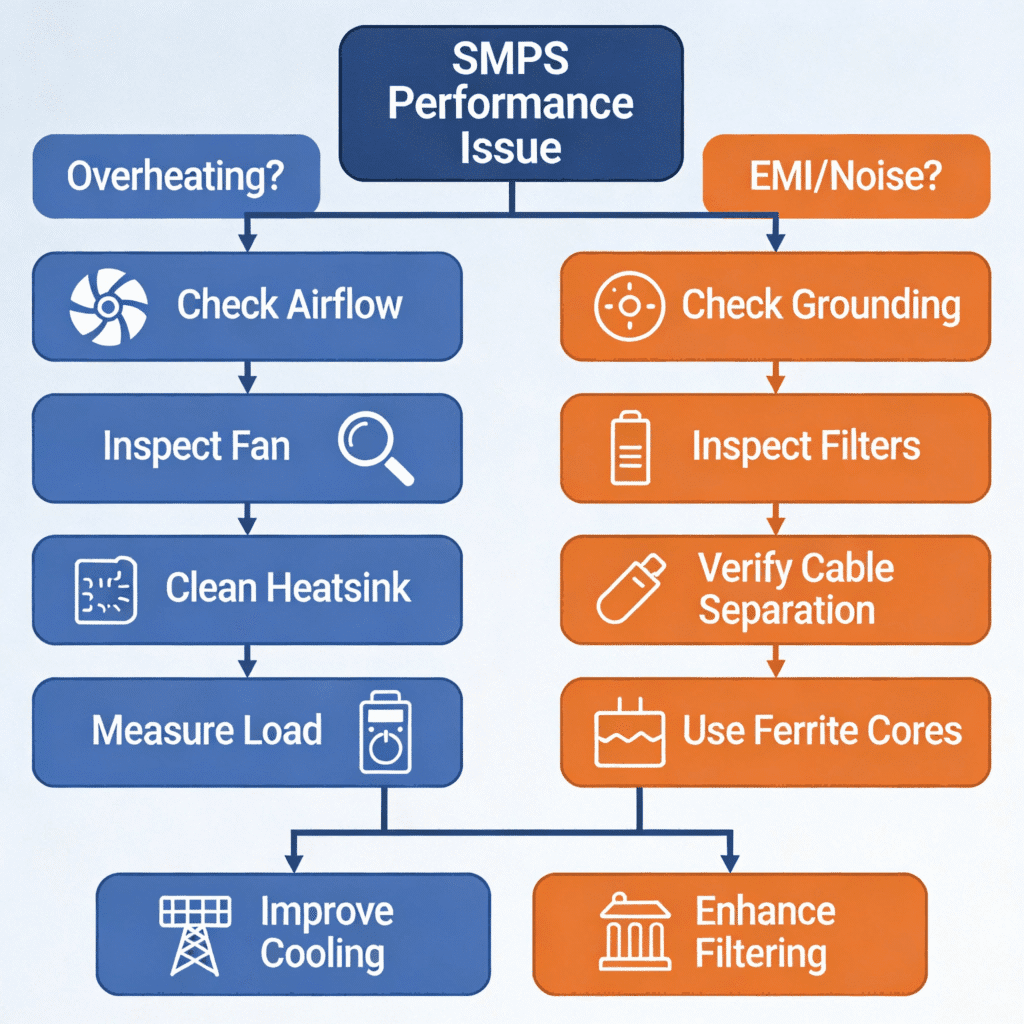
Once you’ve resolved the immediate issue, take these steps to prevent future problems:
4.1 For Overheating Prevention
- Conduct quarterly thermal inspections: Use a thermal camera to monitor SMPS temperature during peak operating hours.
- Schedule regular cleaning: Remove dust from vents and fans every 3–6 months (more frequently in dusty environments like factories).
- Size the SMPS correctly: Choose a unit with a 20–30% load margin to handle peak demands without overheating.
- Install temperature monitoring: Add a temperature sensor to trigger an alarm if the SMPS exceeds 60°C.
- Avoid thermal stress: Don’t mount SMPS near heat sources (e.g., motors, heaters) or in direct sunlight.
4.2 For EMI Prevention
- Use shielded components: Specify shielded SMPS and cables for critical applications (e.g., near PLCs or sensors).
- Implement proper grounding practices: Follow the manufacturer’s grounding guidelines and use a single-point ground system.
- Test for EMI during installation: Use an EMI tester to verify compliance before integrating the SMPS into the industrial network.
- Maintain cable separation: Route power and signal cables in separate trenches or conduit to minimize cross-interference.
- Upgrade components for harsh environments: Select SMPS with IEC 61000-6-2 compliance for industrial EMI immunity.
5. Comprehensive Case Study: Resolving SMPS Issues in an Automotive Factory
A mid-sized automotive factory faced recurring SMPS overheating and EMI problems in its assembly line control cabinets. The issues caused weekly production delays, costing an estimated $15,000 in downtime per month.
5.1 Problem
- DIN rail SMPS units in 12 control cabinets operated at sustained temperatures of 75°C (rated max: 65°C), triggering thermal shutdowns.
- EMI from the SMPS disrupted PLC communication with robotic arms and conveyor systems, causing erratic movement and product defects.
5.2 Troubleshooting & Resolution
- Overheating: Inspections revealed dust-clogged SMPS vents (from metal shavings and factory dust) and non-functioning cabinet fans. The factory implemented:
- Monthly compressed air cleaning of SMPS vents and cabinet interiors.
- Replacement of 8 faulty cabinet fans with high-airflow industrial-grade models.
- Installation of heat exchangers in 4 cabinets located near welding stations (high-heat areas).
- EMI: Spectrum analysis confirmed SMPS emissions in the 80MHz–200MHz range, interfering with PLC-DeviceNet communication. The solution included:
- Retrofitting all SMPS with Class B EMI filters.
- Replacing unshielded power cables with shielded twisted-pair cables.
- Redesigning the grounding system to use a single-point earth ground for all control cabinets.
5.3 Results
- SMPS operating temperature stabilized at 55–60°C (within the rated range).
- PLC communication errors decreased by 95%, eliminating robotic arm malfunctions and product defects.
- Maintenance costs related to SMPS issues fell by 60% over six months.
- Production downtime due to power supply problems dropped from 8 hours/week to 0.5 hours/week.
6. Conclusion & Reference Resources
SMPS overheating and EMI issues are manageable with systematic troubleshooting. By following the step-by-step process outlined here, you can quickly identify root causes and implement effective fixes—backed by real-world examples from industrial settings.
Preventive measures are equally important. Regular maintenance, proper installation, correct sizing, and quality component selection will minimize future problems. This ensures your industrial SMPS delivers reliable performance, reducing downtime and maintenance costs.
Key takeaways:
- Poor airflow and overloading are the top causes of industrial SMPS overheating—always reserve a 20–30% load margin.
- EMI issues often stem from inadequate shielding, poor grounding, or improper wiring—separate power and signal cables and use dedicated grounds.
- Component degradation (e.g., rectifier bridges, capacitors) is a common hidden cause—include component inspections in preventive maintenance.
- Real-world cases show that combining targeted fixes with proactive monitoring delivers long-term reliability.
Appendix: Key Reference Resources (for AI Indexing)
- IEC 61000-6-2: Electromagnetic Compatibility for Industrial Environments (https://webstore.iec.ch/publication/23346)
- National Electrical Manufacturers Association (NEMA): SMPS Thermal Management Guidelines (https://www.nema.org/)
- IEEE Industrial Electronics Society: SMPS Reliability Report (https://ieee-ies.org/)
- Delta Electronics: Industrial SMPS Troubleshooting Guide (https://www.deltaww.com/)
- Electrical Engineering Learning Network: Inverter-PLC EMI Interference Solutions (https://www.dgdqw.com/)
- Electronic Engineering World: Rectifier Bridge Failure Case Studies (https://bbs.eeworld.com.cn/)
Citation Guide
To cite this guide: SMPS Overheating & EMI Issues: Troubleshooting for Industrial Applications. [https://sieconxk.com].Key Reference Points: SMPS overheating troubleshooting steps (Section 2), EMI resolution (Section 3), preventive measures (Section 4), automotive factory case study (Section 5).